Best Cloud Backup for Small Business in 2026
Compare the best cloud backup services for small businesses, including computers, servers, Microsoft 365, Google Workspace and ransomware recovery.

IDrive Business is our leading all-round cloud backup choice for many small businesses because one account can protect multiple computers, users and selected server workloads. Backblaze Business is simpler for organisations that mainly need unlimited workstation backup, while CrashPlan is particularly relevant when endpoint protection must sit alongside Microsoft 365 or Google Workspace backup.
Editorial note: This guide compares current provider documentation, pricing structures and workload coverage. It does not claim hands-on performance results that we have not yet measured. Pricing and features were checked on 23 September 2026 and may change.
Best small-business cloud backup: quick recommendations
| Service | Best for | Pricing model | Important limitation |
|---|---|---|---|
| IDrive Business | Mixed computers, users, servers and NAS devices | Shared storage allowance | Capacity is capped and overage can be expensive |
| Backblaze Business | Simple unlimited backup for employee PCs and Macs | $99 yearly per computer | Servers, NAS and SaaS data need another solution |
| CrashPlan | Managed endpoints plus Microsoft 365 or Google Workspace options | Per user or workload | Separate workloads have separate costs |
| Carbonite Safe Backup Pro | Small Windows-led organisations wanting bundled endpoint/server options | Tiered plans with storage allowances | Plan capacity and inclusions need careful comparison |
| Acronis through a service provider | Broader cyber protection and managed recovery | Provider quotation or usage-based | Pricing and support depend on the chosen partner |
Our overall recommendation: begin with IDrive Business if one account must protect several kinds of small-business device. Choose Backblaze when the requirement is specifically uncomplicated, unlimited employee-computer backup. Choose CrashPlan when centrally managed endpoints and cloud-to-cloud Microsoft 365 or Google Workspace protection are both priorities.
Start with the data your business actually needs
“Back up the business” is not one technical requirement. A small organisation may hold essential information across laptops, desktop computers, external drives, a NAS device, an accounting platform, Microsoft 365, Google Workspace and a website. A subscription that protects only one category can create a dangerous false sense of security.
Before comparing providers, list the systems that would stop the organisation operating if their data disappeared:
- Employee and director laptops
- Shared desktops or office workstations
- File servers and network-attached storage
- Microsoft 365 email, OneDrive, SharePoint and Teams-related data
- Google Workspace Gmail and Drive data
- Accounts, payroll, CRM and line-of-business applications
- Websites, databases, configuration and source code
- Client files, contracts and regulated records
The UK National Cyber Security Centre advises organisations to back up the data they need to operate, protect online backups with two-step verification and verify that important information can actually be restored. It also warns against relying solely on a cloud platform’s native retention mechanisms for critical data. See the NCSC small-organisation backup guidance.
1. IDrive Business — best all-rounder for varied small-business workloads
IDrive Business is the strongest general recommendation for organisations that need one service to cover multiple computers and selected business infrastructure. Its business plans support unlimited users and multiple computers, with documented support for servers, Exchange, SQL and NAS devices depending on configuration.
The principal trade-off is capacity. Rather than offering unlimited data per employee computer, IDrive provides a shared storage allowance. The current public pricing table includes 500GB, 1.25TB, 2.5TB, 5TB and larger business tiers. Promotional prices are common, so decisions should be based on the standard renewal position as well as the initial offer. IDrive states that Business-plan overuse can be charged at $0.50 per GB per month. Review the official IDrive pricing table.
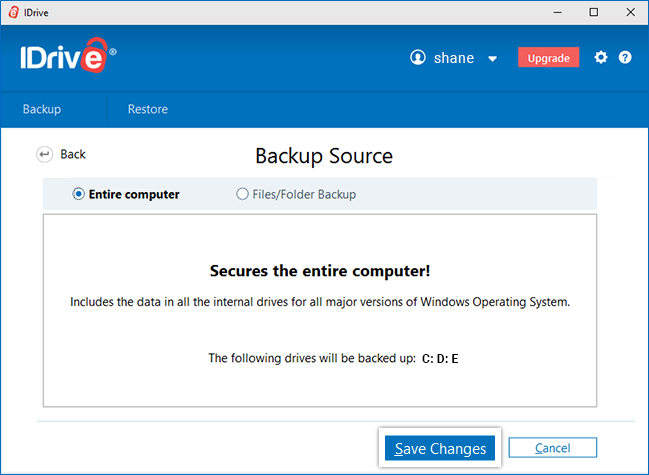
Why IDrive Business stands out
- Multiple users, computers and supported servers can sit under one account.
- The same provider can address laptops, desktops, external drives and several business-server workloads.
- Central web management helps an administrator monitor devices and backup activity.
- Physical data-transfer services can help with large initial backups or restores where available.
- Storage-based pricing can be efficient when many lightly used computers share a reasonable allowance.
What to consider
Capacity planning is essential. A business with 20 office laptops holding 100GB each has a different risk from a video agency with three workstations storing several terabytes apiece. Enable quota alerts, allow room for version history and understand how deleted files continue to consume storage.
Cloud-to-cloud SaaS backup should also be checked separately. An IDrive Business computer-backup plan should not be assumed to include every Microsoft 365 or Google Workspace workload automatically.
Best fit: a small organisation with a mixture of computers, users and local infrastructure that wants broad coverage from one provider.
Read our IDrive review Check IDrive business pricing ↗
2. Backblaze Business — best for straightforward workstation backup
Backblaze Business applies the company’s simple Computer Backup model to business-owned PCs and Macs. It currently costs $99 per year per computer and provides unlimited backup for user-created data on that device. One year of version history is included. Optional Enterprise Control is listed at an additional $24 per computer per year for organisations needing more administration.
See the current Backblaze Business Backup page.
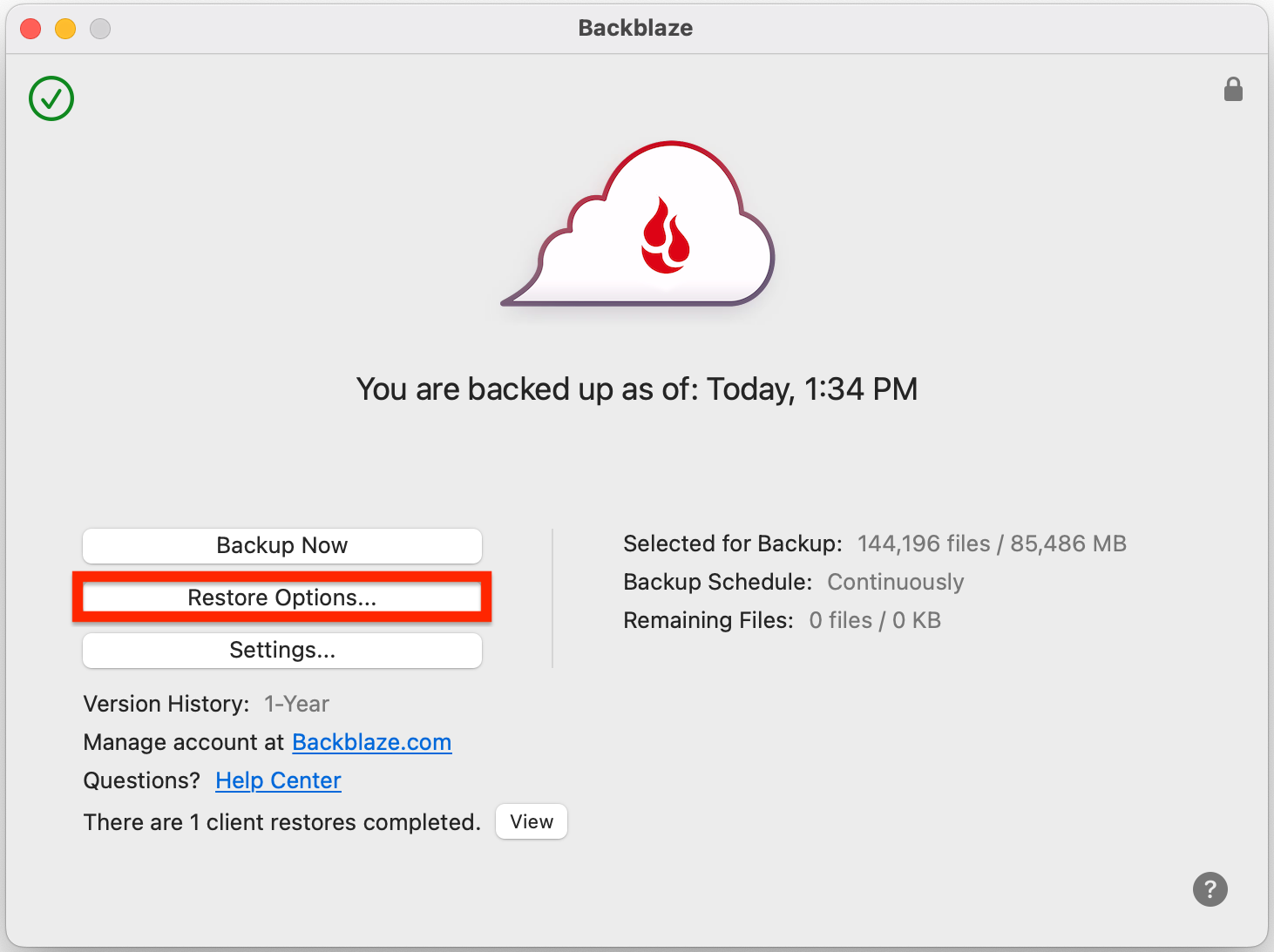
Why Backblaze Business stands out
- Unlimited data removes storage forecasting for each protected workstation.
- Automatic protection is easier to deploy for non-technical employees.
- A clear per-computer price makes budgeting straightforward.
- There are no normal storage-overage fees for Computer Backup.
- Centralised business controls are available when required.
What to consider
This is primarily workstation backup. A file server, NAS device, database or Microsoft 365 tenancy is a different workload and may require Backblaze B2 with compatible software or another provider. A growing company should also compare the cost of many per-computer licences against pooled-storage and per-user alternatives.
Best fit: a professional office or distributed team whose main requirement is uncomplicated backup of employee Windows PCs and Macs.
3. CrashPlan — best for managed endpoints and SaaS backup options
CrashPlan focuses on business data resilience rather than consumer backup. Its small-business offering covers endpoints and provides separate options for Microsoft 365 and Google Workspace. Endpoint documentation describes automatic cloud backup of new and changed files every 15 minutes with unlimited storage.
CrashPlan currently lists endpoint protection at $88 per user per year. Microsoft 365 and Google Workspace protection are each listed at $44 per user per year, including pooled storage of 50GB per user; additional storage terms apply. Check the official CrashPlan SMB pricing.
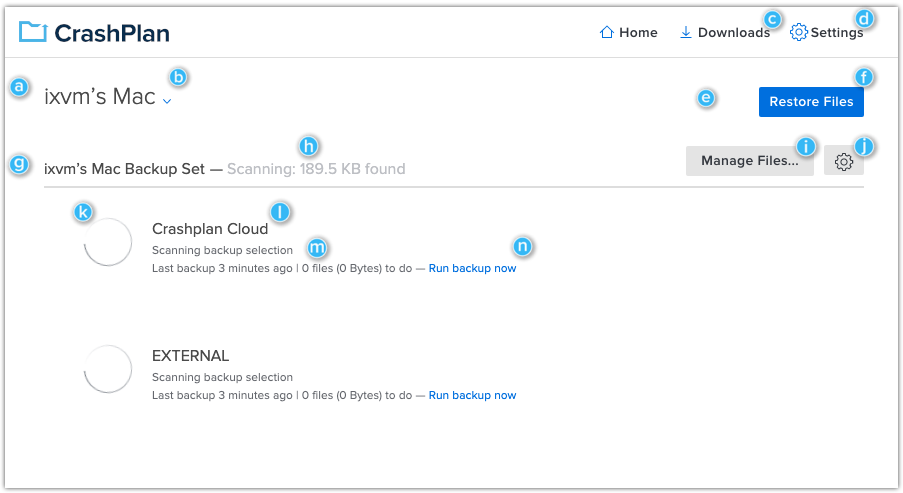
Why CrashPlan stands out
- Central administration is designed for organisations rather than adapted from a consumer account.
- Unlimited endpoint storage reduces capacity concerns for employee-created files.
- Separate Microsoft 365 and Google Workspace products allow cloud-to-cloud protection.
- Versioning and retention controls support recovery from accidental changes and ransomware.
- Self-service restore can reduce routine IT support work.
What to consider
Endpoint, Microsoft 365 and Google Workspace protection are not one universal entitlement. A ten-person business protecting laptops and Microsoft 365 could need two paid workload types for each relevant user. The correct cost comparison must therefore include every required system.
Best fit: a small or medium-sized organisation that values business administration and wants endpoint plus SaaS backup options from one supplier.
4. Carbonite Safe Backup Pro — best for traditional small-office coverage
Carbonite Safe Backup Pro combines multi-computer backup with tiered storage allowances. Its published comparison shows Core, Power and Ultimate business plans supporting up to 25 computers. Current listed annual prices are $287.99 for Core, $799.99 for Power and $1,299.99 for Ultimate, although offers may change.
Core includes 250GB of cloud backup, while Power and Ultimate list 500GB. Additional storage is published at $99.99 per 100GB per year. Higher plans include server-related capabilities. Review the Carbonite plan comparison and the live checkout terms before buying.
Why Carbonite may suit a small office
- One business subscription can cover several computers.
- Higher tiers can include server protection.
- The product follows a familiar automatic-backup model.
- External-drive support is available on business tiers.
What to consider
The included capacity is modest compared with some modern data sets, and additional storage can materially change the total price. Businesses should map their actual retained data, growth rate and versioning needs before selecting a tier.
Best fit: a small, relatively traditional office with predictable data volumes and a preference for a long-established backup supplier.
5. Acronis — best when backup is part of managed cyber protection
Acronis Cyber Protect Cloud is delivered primarily through managed service providers rather than as a simple consumer-style checkout. It combines backup with broader security and management capabilities, which can be valuable for a company that wants an IT partner to monitor protection and help coordinate recovery.
Because packaging, data-centre region, storage and support are set through the provider, businesses should request a written quotation covering every protected workload and the responsibilities of both parties. The Acronis service-provider overview explains its flexible licensing model.
Why Acronis may suit you
- Backup, endpoint security and management can be brought together.
- Service-provider delivery can give small companies access to recovery expertise.
- Physical, virtual and cloud workloads can be addressed within a broader platform.
- Image-based recovery supports complete-system scenarios.
What to consider
The quality of implementation and support depends significantly on the chosen provider. Ask who monitors failed backups, how quickly support responds, how restore testing is documented and how data can be exported if the relationship ends.
Best fit: a business that prefers a managed IT relationship and needs backup as part of a wider cyber-protection service.
Read our Acronis review Explore Acronis business protection ↗
Other strong option: EaseUS Todo Backup Business
EaseUS offers Workstation, Server, Advanced Server and Technician editions for Windows-led organisations. The range supports local and cloud destinations, system imaging and specialised server workloads, while EaseUS Backup Center can centrally manage Todo Backup clients.
The correct edition depends on each protected workstation, server, database and storage target. It is therefore best for businesses willing to design and maintain a structured recovery plan rather than those wanting a single unlimited endpoint subscription.
Read our EaseUS review Explore EaseUS business backup ↗
Small-business backup services compared
| Requirement | Best starting option | Why |
|---|---|---|
| Unlimited PC/Mac backup | Backblaze Business | Simple per-computer licensing with unlimited data |
| Many device and server types | IDrive Business | Broad workload support under a pooled allowance |
| Managed employee endpoints | CrashPlan | Business-focused administration and unlimited endpoint storage |
| Microsoft 365 or Google Workspace | CrashPlan or a dedicated SaaS backup | Cloud-to-cloud protection is explicitly licensed |
| Traditional small office with servers | Carbonite Safe Backup Pro | Tiered computer and server packages |
| Managed security and recovery | Acronis partner | Backup can be delivered within a wider managed service |
Do you need Microsoft 365 backup?
Microsoft operates resilient infrastructure and provides retention features, but this does not remove the customer’s responsibility to protect business information. Accidental deletion, malicious administrator activity, ransomware-synchronised changes and retention misconfiguration can still create recovery gaps.
A Microsoft 365 backup should state which services are covered—Exchange Online, OneDrive, SharePoint and Teams-related content do not always have identical protection. Check:
- Backup frequency and retention duration
- Point-in-time and item-level restore options
- Recovery to the original or an alternative user
- Support for shared mailboxes, archives and departed employees
- Storage allowance and overage pricing
- Administrative MFA, audit logs and role separation
- Data location and contractual processing terms
The same principle applies to Google Workspace, accounting platforms and other SaaS products: native availability is not necessarily an independent backup.
Ransomware-resistant backup requirements
A backup stored online can still be attacked if the same administrator credentials can delete it. CISA recommends frequent backups, offline or cloud-to-cloud copies, regular recovery testing, delete protection and versioning where supported. See the CISA StopRansomware guide.
For a small business, the practical controls are:
- Require MFA for backup administrators.
- Use a separate backup-administrator account rather than an everyday email login.
- Keep at least one copy isolated, offline or protected by immutability/object lock.
- Retain enough versions to recover from an infection that went unnoticed.
- Alert someone when backups fail, devices stop checking in or capacity is nearly full.
- Test both a small file restore and a larger business-recovery scenario.
- Document the order in which systems must be recovered.
How much should a small business spend?
There is no useful single average because workloads differ. Ten lightweight office laptops may cost less to protect than one server containing several terabytes of data. A realistic budget must include:
- Number of users and computers
- Current stored data and annual growth
- Servers, NAS devices and databases
- Microsoft 365 or Google Workspace seats
- Required retention and legal holds
- Large-restore or courier charges
- Managed-service and recovery support
- Time spent monitoring and testing backups
Compare a three-year total rather than an introductory first-year rate. Include overage charges and the cost of every separate workload. The cheapest subscription is poor value if it protects only the laptops while leaving shared cloud email or the accounts database outside the recovery plan.
A practical buying checklist
- Inventory the workloads. List devices, SaaS accounts, servers, websites and databases.
- Set recovery priorities. Decide what must return within hours and what can wait several days.
- Estimate capacity. Include growth, deleted-file retention and multiple versions.
- Check security. Require MFA, encryption, administrative logs and separation from normal credentials.
- Confirm restore methods. Understand browser restore, application restore, bulk download and physical media options.
- Run a pilot. Protect representative systems before committing the entire company.
- Perform a test recovery. Measure whether restored data is complete and usable.
- Assign ownership. Name the person or supplier responsible for reviewing failures and testing recovery.
Related business backup comparisons
Frequently asked questions
Is OneDrive enough backup for a small business?
Not by itself for most organisations. OneDrive is valuable storage and synchronisation, but deletions, permissions and unwanted changes may also propagate. Important Microsoft 365 data should be assessed against an independent backup and retention requirement.
Should small businesses use unlimited or storage-based backup?
Unlimited per-device pricing suits data-heavy workstations and keeps budgeting simple. Shared storage can be more efficient when many computers hold relatively little data or when servers and several device types must use one account.
How often should a business test restores?
Test representative files regularly and run a broader recovery exercise whenever systems, personnel or suppliers change. Critical organisations may test quarterly or more frequently; the appropriate schedule depends on the cost of failure.
Does backup replace disaster recovery?
No. Backup supplies recoverable data. Disaster recovery also defines people, systems, communications, priorities, replacement infrastructure and the process for resuming operations.
Should backups be kept in the same Microsoft or Google account?
An independently controlled service reduces the risk that one compromised administrator account can damage both the production data and its backup. Review identity separation and deletion protection with the provider.
Final verdict
IDrive Business is the best general starting point for a small company with varied devices and local workloads, provided storage use is monitored carefully. Backblaze Business is the clearest option for unlimited employee-computer backup. CrashPlan is particularly relevant for centrally managed endpoints and separately licensed Microsoft 365 or Google Workspace protection.
No product should be selected solely from a feature table. Run a pilot, restore real representative data, record the result and retain at least one additional protected copy of information the business cannot afford to lose.
Sources and checking: Provider features and prices were checked against official IDrive, Backblaze, CrashPlan, Carbonite, Acronis and EaseUS information, with EaseUS details updated on 29 September 2026. Security recommendations were checked against NCSC and CISA guidance. Some outbound links are affiliate links, but affiliate availability does not determine inclusion or ranking.