IDrive vs Acronis True Image: Which Backup Is Better?
IDrive offers multi-device cloud capacity; Acronis provides disk imaging and complete-system recovery. Compare pricing, protection and restore options.

IDrive is the better-value choice for backing up several devices to a large shared cloud allowance. Acronis True Image is the stronger choice when complete disk images, system recovery and integrated ransomware protection matter more than raw cloud capacity.
These products overlap, but they are built around different recovery goals. IDrive starts with cloud file backup across multiple devices. Acronis starts with complete cyber protection: local and cloud backup, disk cloning, recovery media and security tools inside one application.
IDrive vs Acronis: quick verdict
| Category | IDrive Personal | Acronis True Image |
|---|---|---|
| Best for | Several computers and mobile devices | Whole-machine and disk-image recovery |
| Cloud storage | Large shared allowances such as 5TB and 10TB | Plan-dependent: none on Essentials, 50GB on Advanced and 1TB on Premium before upgrades |
| Device model | Multiple devices within one allowance | Subscriptions for 1, 3 or 5 computers, depending on plan |
| Local backup | Supported | A major strength, including disk and partition images |
| Disk cloning | Not its primary purpose | Included in the True Image toolset |
| Cybersecurity | Backup-focused account security | Anti-ransomware and malware-protection features integrated |
| Complexity | Detailed but recognisable backup interface | More features and recovery choices to configure |
| Our winner | Best for cloud capacity and multiple devices | Best for complete-system protection |
Different products for different recovery jobs
IDrive is designed to collect backups from multiple computers and supported mobile devices inside one capacity-based account. It can also make local backups, but cloud capacity and multi-device coverage are the central proposition.
Acronis True Image can create file backups, disk images and recovery media. A disk image captures far more than ordinary documents: it can include the operating system, installed applications, settings and partitions. That makes Acronis suitable for somebody who wants to rebuild a failed drive or restore a complete machine rather than simply download files.
Pricing compared
IDrive lists its standard 5TB Personal plan at $99.50 per year and frequently advertises a substantial first-year discount. Renewal pricing is the useful comparison because the initial offer may apply only once. A 10TB tier is available for larger multi-device collections.
Acronis separates local and cloud protection. Its official comparison page lists Essentials from $49.99, Advanced from $72.99 and Premium at a higher level, with prices varying by computer count and promotion. Essentials provides local backup but no included cloud storage. Advanced includes 50GB, while Premium includes 1TB and can be expanded.
| Requirement | Better fit | Reason |
|---|---|---|
| 5TB shared by several computers | IDrive | Large cloud allowance is part of the standard proposition |
| Full image of one system drive | Acronis | Disk and partition imaging is a core feature |
| Local backup without cloud storage | Acronis Essentials | Lower tier is intentionally local-first |
| Phones plus several PCs and Macs | IDrive | Multi-device allowance is more efficient |
| One computer with integrated malware protection | Acronis | Security tools are bundled with backup |
Backup coverage
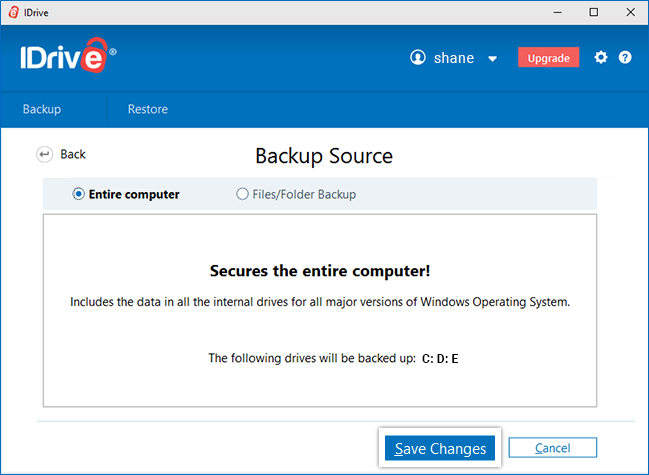
IDrive lets users select files and folders across multiple computers. It also offers local backup and additional products for NAS, servers and cloud applications. Personal customers should check what consumes their allowance and monitor overuse because capacity is not unlimited.
Acronis can protect selected files, disks, partitions and entire machines. Local images can be stored on external drives or network destinations, while cloud backup requires a suitable plan and sufficient Acronis Cloud capacity. Its flexibility is excellent, but users must understand which jobs are local and which are off-site.
Restore and disaster recovery
IDrive provides online restore and supports large-data transfer through IDrive Express, subject to plan eligibility and location. File restores are straightforward, and local backups give another recovery path.
Acronis goes further for system disasters. Recovery media can start a computer whose normal operating system will not boot. A disk image can restore the operating system and applications as well as files, and Universal Restore is designed for recovery to different hardware where supported.
This distinction matters after drive failure. Restoring documents from IDrive gets the data back, but applications and settings still need to be rebuilt. Restoring a suitable Acronis image can return the machine much closer to its earlier state.
Ransomware and security
IDrive encrypts backup data and provides account-protection options. It remains principally a backup service, so endpoint security should be supplied by the operating system or separate security software.
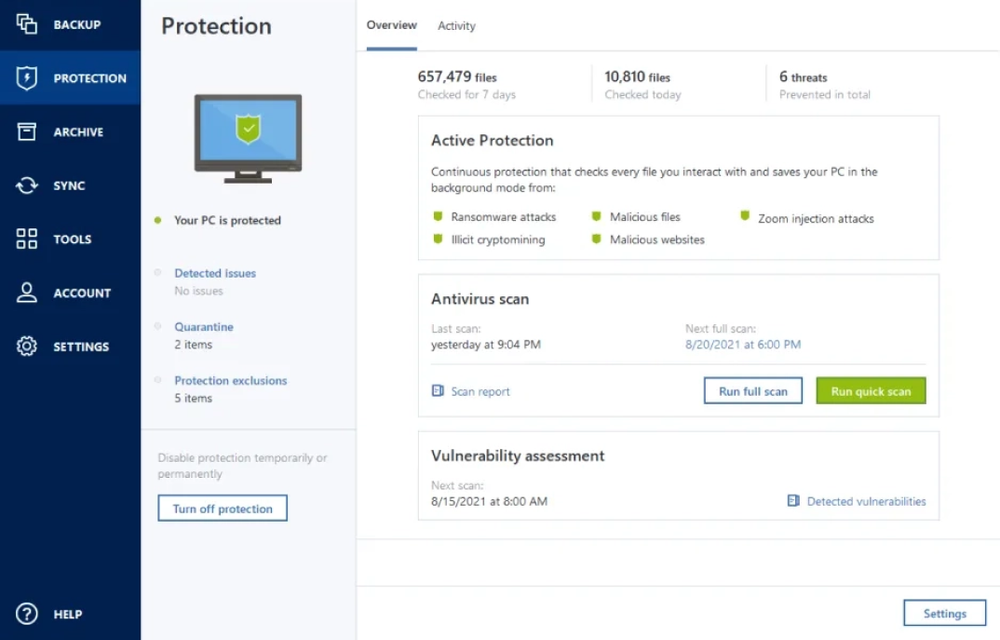
Acronis integrates active anti-ransomware and malware-protection features. This consolidation can simplify protection for a home user, although bundled security also increases the number of settings and background components. Keep the product updated and do not rely on threat detection as a substitute for separated backups.
Ease of use
IDrive presents more controls than minimalist services such as Backblaze, but its concepts—backup set, schedule, restore and storage allowance—are familiar. The main maintenance task is checking capacity and confirming every device is still reporting.
Acronis is polished but inherently more complex because it handles file backup, disk imaging, cloning, recovery media and security. It rewards users who configure several layers deliberately. Somebody who only wants a quiet cloud copy of documents may not use enough of the feature set to justify it.
Which should you choose?
Choose IDrive if:
- you need one subscription for several computers and phones;
- 5TB or 10TB is enough for the combined collection;
- cloud backup capacity is more important than disk imaging;
- you want cloud and local backup without a security suite.
Choose Acronis True Image if:
- you want to restore a complete computer, not only documents;
- disk cloning and bootable recovery media are important;
- you want local images alongside cloud backup;
- integrated anti-ransomware protection adds value.
Final verdict
IDrive wins on multi-device cloud value; Acronis wins on recovery depth. IDrive is easier to justify for a family with several machines because a large allowance is shared across them. Acronis is worth the extra complexity when downtime, complete-machine recovery or disk migration matters.
Our detailed IDrive review and Acronis True Image review explain the individual plans and limitations. See the best personal cloud backup guide for more alternatives.
Compare your options
Read our IDrive review Check IDrive pricing ↗
Read our Acronis review Check Acronis plans ↗
Frequently asked questions
Does Acronis include unlimited cloud storage?
No. Cloud capacity depends on the tier and any storage upgrade. Essentials is local-only, while higher tiers include defined cloud allowances.
Can IDrive make a full system image?
IDrive provides broad backup capabilities, but Acronis True Image is the clearer specialist choice for disk images, cloning and bootable whole-machine recovery.
Which is better for a family?
IDrive usually offers the more practical subscription shape because several devices share one large cloud allowance.
Which is better against ransomware?
Acronis includes active anti-ransomware tools, while both products can supply recoverable backup copies. A protected, tested backup remains necessary even when security software is installed.
Sources
Details checked 23 September 2026. Promotions, included storage and renewal prices can change. Some links are affiliate links; we may earn a commission at no extra cost to you.