IDrive Review 2026: Is It Best for Multiple Devices?
IDrive protects multiple computers and mobile devices under one account. Our independent review covers pricing, storage, security, snapshots and restores.
IDrive is an excellent personal backup choice for families and individuals protecting several computers and mobile devices. Its pooled storage, snapshots, local backup and physical-drive transfers provide exceptional flexibility, although the application is more complex and capacity must be monitored.
What we like
- ✓Multiple computers under one account
- ✓Cloud and local backup tools
- ✓Up to 30 previous file versions
- ✓Mobile backup and Cloud Drive sync
- ✓IDrive Express physical transfers
Where it falls short
- –Storage allowance is not unlimited
- –Overage can become expensive
- –Promotional pricing can obscure renewal cost
- –Interface is more complex than Backblaze
Rating breakdown
Affiliate disclosure: we may earn a commission from selected links, without increasing the price you pay. This does not determine our verdict.
IDrive is one of the strongest personal cloud backup choices for households with several computers and mobile devices. Unlike unlimited services that charge for each computer, IDrive combines multiple devices under one storage allowance. Its 5TB plan offers excellent flexibility, although the interface is more involved and users must monitor capacity and renewal pricing.
Review basis: This independent review assesses IDrive using its current published plans, documentation, security information and recovery features. We do not claim controlled speed or restore-test results that have not yet been measured. Details were checked on 23 September 2026.
IDrive review: quick verdict
| Our verdict | Excellent multi-device backup with broad features and competitive pooled storage |
|---|---|
| Best for | Families and individuals protecting several computers and mobile devices |
| Current pricing | 5TB standard annual pricing commonly listed around $99.50, with frequent introductory offers |
| Storage | Capacity-based plans rather than unlimited storage |
| Version history | Up to 30 previous versions of backed-up files |
| Supported devices | Windows, macOS, supported Linux workflows, iOS and Android |
| Free option | 10GB IDrive Basic account |
| Our assessment | 4.5 out of 5 |
Bottom line: IDrive is our preferred personal-backup shape for a household with several computers. It combines cloud backup, local backup, sync, snapshots and physical data transfer in one account. Backblaze remains easier for one computer with a very large data set, while IDrive rewards users willing to manage a storage allowance and a more detailed application.
What is IDrive?
IDrive is a cloud backup and storage provider serving personal, team and business customers. The Personal plan is designed for one account holder who wants to protect data from multiple computers and supported mobile devices.
The service combines several functions that competitors sometimes sell separately:
- Cloud backup for files and folders
- Local backup to attached storage
- Multiple-computer protection under one account
- Mobile photo, video and selected device-data backup
- Cloud Drive file synchronisation
- Snapshots and previous file versions
- Entire-machine backup and disk-cloning tools on supported platforms
- IDrive Express physical-drive transfers
This breadth is IDrive’s main advantage—and the source of some complexity. New users must distinguish backup, sync, local backup, Express transfers and separate products such as IDrive e2 object storage.
IDrive Personal pricing in 2026
IDrive regularly changes promotional pricing, particularly for the first subscription term. The figures shown at checkout can therefore differ from headline offers on landing pages.
| Plan | Published pricing position | Best suited to |
|---|---|---|
| Basic | Free with 10GB | Trying the software and protecting a small selection of files |
| Personal 5TB | Standard annual pricing commonly around $99.50; introductory discounts are frequent | Most individuals and smaller households |
| Personal 10TB | Higher annual or monthly subscription | Several computers or larger photo and video collections |
| Larger Personal tiers | Monthly, yearly and multi-year options may be available | High-capacity households that still prefer one account |
Always compare the first payment with the automatic renewal price on the final order screen. The official IDrive pricing page and Personal plan order page provide the current options.
Storage overage is important
IDrive is not unlimited. If usage exceeds the purchased allowance, additional charges may apply. The provider has historically listed Personal-plan overuse at $0.25 per GB per month, but users should confirm the current rate in their account and terms.
A 500GB overage at that rate would cost $125 for one month, so capacity alerts deserve attention. A family backing up several computers should total current data, allow room for growth and avoid using the cloud allowance as an unmanaged archive.
How IDrive backup works
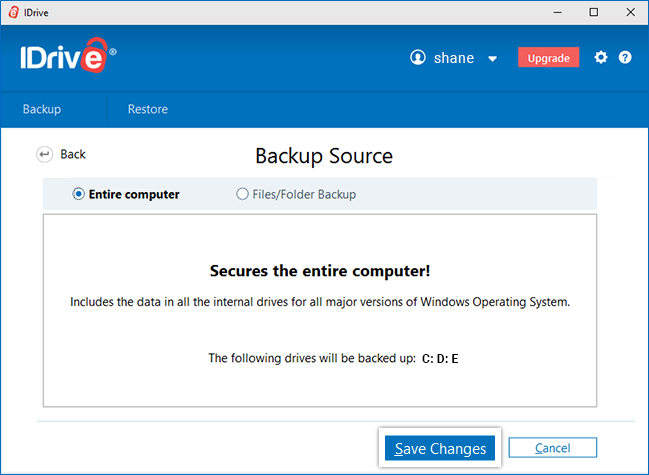
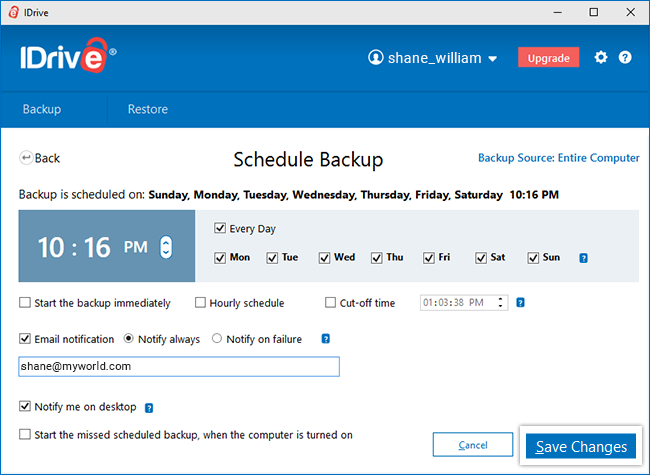
After installing the desktop application, users select files and folders for cloud backup, local backup or both. Important folders may be selected by default, and scheduled jobs can run daily, on selected days or at hourly intervals.
After the initial upload, IDrive transfers modified portions of supported files rather than repeatedly uploading everything. This incremental approach reduces bandwidth and shortens routine backup jobs.
Multiple-device backup
One Personal account can back up multiple Windows PCs, Macs and supported mobile devices within the purchased storage allowance. This is the clearest difference from Backblaze and Carbonite personal plans, which are normally licensed per computer.
Each device retains its own folder structure in the account. Users should apply meaningful device names, review backup sets separately and remove retired devices carefully so that old data does not consume capacity indefinitely.
Local and cloud backup together
IDrive can create local backups alongside cloud copies. This supports a practical 3-2-1-style strategy: working data on the computer, a fast local recovery copy on an external drive and an off-site copy in IDrive.
Local backup is especially valuable when a failed computer contains several terabytes. Restoring from a directly attached drive is normally much faster than downloading the same data over a home internet connection.
Snapshots and file versioning
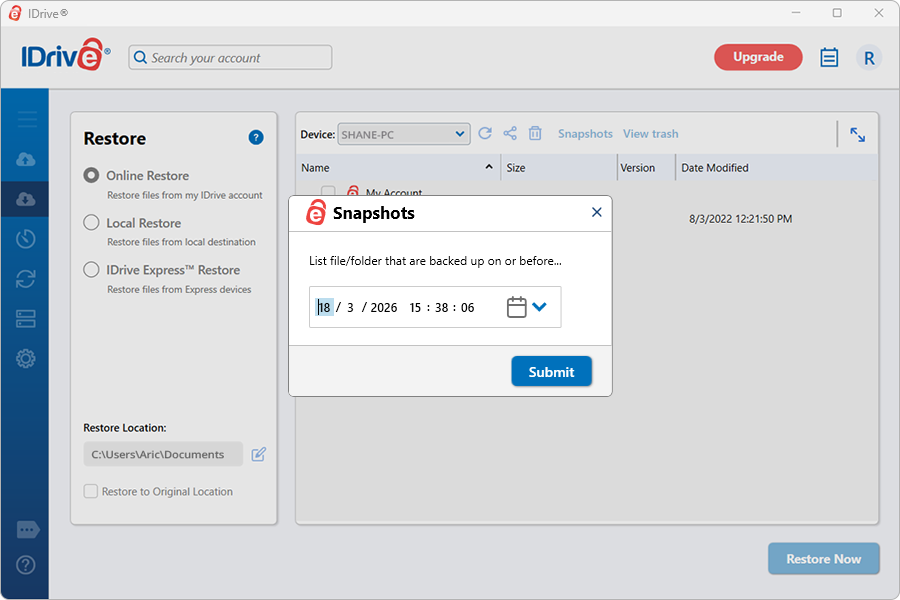
IDrive documents retention of up to 30 previous versions of backed-up files. Snapshots use this version history to present a point-in-time view, helping users recover data from before accidental changes, corruption or ransomware.
The provider states that older versions do not count against the account’s normal storage calculation; the latest file view determines quota usage. This is a meaningful advantage over services where every retained version consumes paid capacity.
Snapshots are not a reason to ignore account security. Ransomware recovery works only if clean versions were uploaded, remain available and the attacker did not gain control of the backup account. Enable multi-factor authentication and keep another independent copy of irreplaceable data.
True Archiving: useful but potentially confusing
IDrive’s True Archiving behaviour means files are not necessarily removed from the cloud merely because they disappear from the computer. This can protect against accidental local deletion and can preserve files intentionally removed from a device.
The trade-off is capacity management. Old folders may continue using storage until the user deletes them from the account or runs Archive Cleanup. Archive Cleanup compares cloud content with the active backup set and can permanently remove unmatched data, so its deletion preview should be reviewed carefully.
IDrive Express
IDrive Express uses a physical storage device shipped between IDrive and the customer. It can accelerate an initial backup or a large restore without consuming broadband capacity for the entire transfer.
The provider describes one free Express shipment per year for many Personal plans, with additional requests or international shipping subject to current terms. Availability, included direction of transfer, taxes and shipping charges should be confirmed for the customer’s country.
IDrive Express is particularly useful for:
- Multi-terabyte initial backups
- Homes with slow or capped upload connections
- Recovery after a complete drive failure
- Users who cannot wait days for a large internet restore
See the official IDrive Express explanation.
Entire-machine backup and disk cloning
IDrive provides entire-machine backup and disk-cloning capabilities on supported systems. These can protect operating-system information, applications, settings and data in addition to ordinary file backup.
This makes IDrive broader than Backblaze, which primarily restores user-created files after the operating system and applications have been reinstalled. However, full-machine recovery is more demanding than restoring a document folder. Users should create recovery media where required, understand the documented process and test it before relying on it.
Mobile backup
IDrive’s iOS and Android applications can back up supported phone data such as photos and videos, with available options varying by platform. This is useful for households wanting computer and mobile protection under one account.
Mobile backup should still be checked independently. Confirm that full-resolution originals are uploading, background permissions remain enabled and the application is not being restricted by battery-saving settings. Restore several photographs and a video to verify the result.
Cloud Drive sync
IDrive includes a separate Cloud Drive synchronisation area. Sync keeps selected files available across linked devices, while backup preserves protected device data for recovery.
The distinction matters: deleting or changing a synchronised file can propagate the change to other devices, whereas backup and version history are designed to recover earlier states. Treat sync as a productivity feature and backup as the recovery layer.
Security and privacy
IDrive states that data is protected using 256-bit AES encryption during transfer and storage. Users can choose a private encryption key that is not stored on IDrive’s servers.
A private key can improve confidentiality because the provider cannot retrieve it for the user. The consequence is severe: if the key is lost, the encrypted backup may be permanently inaccessible. Store it in a reputable password manager and preserve a recovery copy separately from the protected devices.
Recommended security configuration
- Create a unique account password.
- Enable two-factor authentication.
- Choose a private key only if it can be preserved reliably.
- Store recovery information away from protected computers.
- Review signed-in devices and account notifications.
- Test restores from both recent and older versions.
Backup and restore performance
The initial cloud backup may take days or weeks. Total time depends on the volume of data, sustained upload speed, device availability and the number of small files.
At an ideal continuous 20Mbps upload rate, 1TB takes roughly five days before protocol overhead and interruptions. IDrive Express can avoid much of that wait for eligible customers.
We have not assigned laboratory transfer-speed scores in this review. Reliable comparisons require identical hardware, connections, regions and test data. The more important practical question is whether the service completes the initial backup and whether representative files can be restored successfully.
IDrive versus Backblaze
| Feature | IDrive Personal | Backblaze Personal |
|---|---|---|
| Storage model | Shared capacity allowance | Unlimited per licensed computer |
| Computers | Multiple devices under one account | One computer per subscription |
| Mobile backup | Supported phone data | Mobile app primarily accesses computer backups |
| Local backup | Included in the desktop application | Not its main purpose |
| Full-machine tools | Available on supported systems | File-focused rather than disk imaging |
| Ease of use | Powerful but more complex | Simpler automatic setup |
| Best fit | Household with several devices | One computer with a large data set |
Choose IDrive for several devices, local backup and broader recovery tools. Choose Backblaze when one PC or Mac contains a large amount of data and simplicity is the priority. Read our Backblaze review and personal cloud backup comparison for more detail.
Who should choose IDrive?
IDrive is a strong choice if:
- You need to protect several household computers.
- You want mobile and desktop backup under one account.
- You prefer a shared 5TB or 10TB allowance.
- You want cloud and local backup in the same application.
- Snapshots and previous versions are important.
- A physical-drive transfer could simplify a large backup or restore.
Consider an alternative if:
- You have one computer with more data than the affordable allowance.
- You want the simplest possible automatic application.
- You are unlikely to monitor quota and overage.
- You dislike promotional pricing followed by a higher renewal.
- You need a less feature-dense interface.
How we would configure IDrive
- Calculate the used space across every device before selecting capacity.
- Install the desktop app on the most important computer first.
- Review the default backup set rather than accepting it blindly.
- Configure local backup to an external drive.
- Enable two-factor authentication.
- Decide whether a private encryption key is appropriate.
- Set capacity alerts and check usage regularly.
- Test a recent-file restore and a previous-version restore.
- Add other family devices methodically and name them clearly.
- Check the renewal price before the introductory term ends.
Frequently asked questions
Is IDrive unlimited?
No. Personal plans provide a defined storage allowance shared across protected devices. Users must monitor usage because overage charges may apply.
Can IDrive back up multiple computers?
Yes. One Personal account can protect multiple PCs and Macs within the purchased allowance, which is one of its main advantages over per-computer subscriptions.
Does IDrive retain deleted files?
IDrive’s True Archiving behaviour can retain files removed from a computer until they are manually deleted from the account or removed through Archive Cleanup. Trash and version-retention rules should also be reviewed.
How many file versions does IDrive keep?
IDrive currently documents retention of up to 30 previous versions of backed-up files for most current accounts.
Does version history use the storage quota?
IDrive states that previous versions do not increase the normal quota calculation; the latest version of backed-up data determines usage.
Can IDrive back up phones?
Its iOS and Android apps can protect supported data including photos and videos. Available categories and background behaviour depend on the mobile platform.
Is IDrive Express free?
Many Personal subscriptions include one Express shipment per year, but eligibility, international shipping and additional requests depend on current plan terms.
Is IDrive suitable for UK customers?
UK customers can subscribe, although plans are generally displayed in US dollars. Exchange rates, card charges, taxes and physical-drive shipping terms should be checked before purchase.
Final verdict
IDrive is our leading choice for personal cloud backup across multiple computers and mobile devices. Its pooled storage, local-backup support, snapshots, versioning and Express transfer service offer far more flexibility than a simple one-computer subscription.
The service requires more management. Capacity is finite, overage can be expensive, introductory discounts can obscure renewal cost and the application presents many overlapping features. Users who want effortless unlimited backup for one computer may prefer Backblaze.
For a household willing to review its settings and storage usage, IDrive delivers an unusually complete backup toolkit at a competitive price. Pair it with a local external drive, secure the account and prove that restores work before an emergency.
Editorial independence: Prices and features were checked against official IDrive information on 23 September 2026. This draft contains no paid placement. If an affiliate relationship is added later, it will not determine the rating or recommendation.