Backblaze Review 2026: Is Unlimited Cloud Backup Worth It?
Backblaze offers simple, unlimited cloud backup for one PC or Mac. Our independent 2026 review examines pricing, security, restores and limitations.
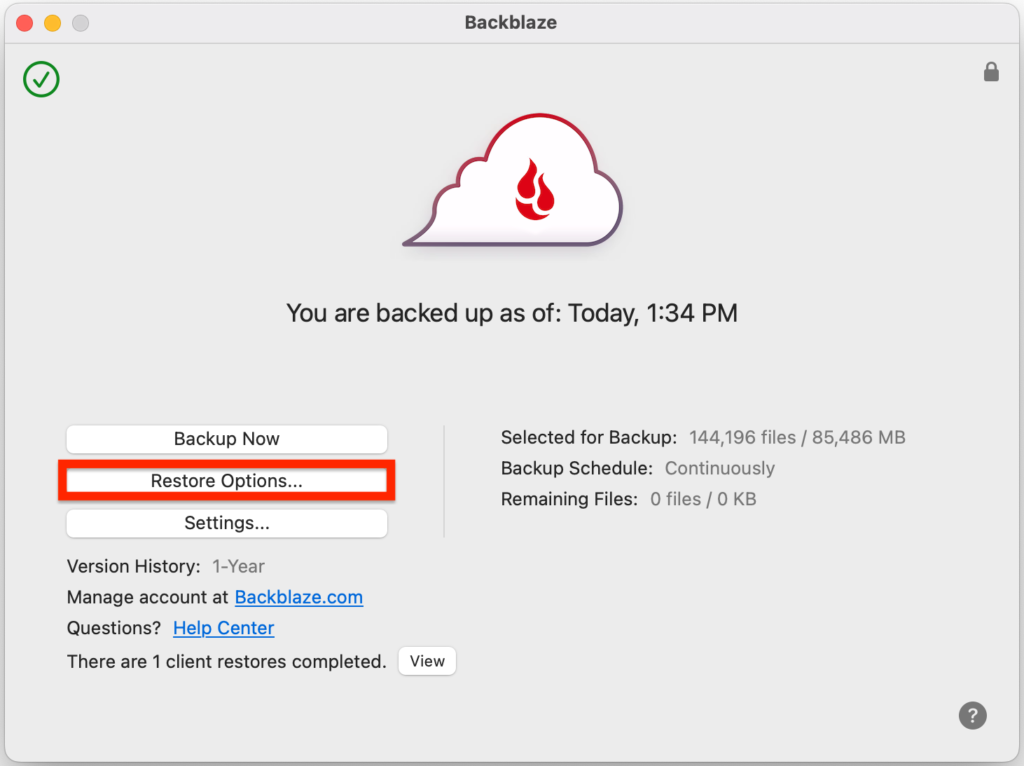
Backblaze is an excellent choice for straightforward, unlimited backup of one Windows PC or Mac. It is easy to configure, sensibly priced and particularly strong for users with large photo or video collections. Its main limitation is that every computer requires a separate subscription.
What we like
- ✓Unlimited backup capacity
- ✓Simple automatic protection
- ✓One-year version history available free
- ✓Connected external-drive support
- ✓Clear, predictable pricing
Where it falls short
- –Each computer needs a separate licence
- –No native NAS backup in the Personal plan
- –No full-system image recovery
- –Large online restores can take time
Rating breakdown
Affiliate disclosure: we may earn a commission from selected links, without increasing the price you pay. This does not determine our verdict.
Backblaze is one of the easiest cloud backup services to recommend for a single Windows PC or Mac. It automatically protects user-created files, offers unlimited storage and avoids the capacity calculations required by most rivals. The main catch is equally simple: every computer needs its own subscription.
Review basis: This independent review assesses Backblaze using its current published plans, documentation, security information and recovery options. We do not claim laboratory speed results or hands-on restore findings that have not yet been measured. Details were checked on 23 September 2026.
Backblaze review: quick verdict
| Our verdict | Excellent for straightforward, unlimited backup of one computer |
|---|---|
| Best for | Individuals, home workers and creators with one main PC or Mac |
| Current price | $9 monthly, $99 yearly or $189 for two years |
| Storage | Unlimited for one licensed computer |
| Version history | 30 days by default; one year can be enabled free |
| Supported computers | Windows and macOS |
| Free trial | 15 days |
| Our assessment | 4.6 out of 5 |
What we like
- Unlimited backup capacity
- Automatic file selection and continuous protection
- Simple, transparent pricing
- One-year version history available free
- Connected external-drive support
- Private encryption key option
- Web and mailed-drive recovery choices
What could be better
- Subscription covers only one computer
- No native NAS backup in the Personal plan
- Not designed for full-system image recovery
- External drives must remain part of the backup routine
- Private-key recovery still requires careful trust and key management
- Large web restores can take time
Bottom line: Backblaze is our leading personal cloud backup choice when simplicity matters more than advanced configuration. It is particularly compelling for one computer containing several terabytes of photos, video or other personal files. Families with several laptops should compare the total per-computer cost with IDrive or another shared-capacity service.
What is Backblaze?
Backblaze is a US cloud-storage company founded in 2007. Its consumer product, now presented as Backblaze Computer Backup or Personal Backup, is distinct from Backblaze B2 Cloud Storage.
Computer Backup is the automatic application reviewed here. You install it on a Windows PC or Mac and it sends supported user data to Backblaze’s cloud. B2 is usage-priced object storage intended for applications, NAS tools, servers and customers who want more control. The two products share a company name but have different pricing and workflows.
That distinction matters. Someone who wants to protect a laptop should normally start with Personal Backup. Someone backing up a Synology NAS, application server or large archive through third-party software should investigate B2 instead.
Backblaze pricing in 2026
Backblaze currently offers three billing periods for Personal Backup:
| Billing option | Current price | Effective monthly cost |
|---|---|---|
| Monthly | $9 | $9.00 |
| Annual | $99 | $8.25 |
| Two years | $189 | About $7.88 |
All three options provide unlimited backup storage for one computer. The two-year plan has the lowest effective monthly cost, but the 15-day trial should be used before committing. See the official Backblaze pricing page for the latest figure.
Is Backblaze good value?
For one computer with a large amount of data, yes. A user backing up 4TB pays the same subscription price as someone protecting 400GB. That makes Backblaze attractive for photographers, videographers and anyone who does not want to monitor a storage quota.
The calculation changes for multiple computers. Two computers cost $198 per year on annual billing; four cost $396. A family with several devices may find a pooled 5TB or 10TB plan cheaper, provided the allowance is large enough.
Backblaze also does not replace every type of backup. A local external drive remains valuable for fast recovery, and the Personal plan is not a NAS or server-backup licence.
How Backblaze backup works
Backblaze is deliberately different from tools that ask users to build a complicated backup set. After installation, it scans the computer and selects supported user-created files automatically. Backups then run in the background whenever the computer is online.
This default approach is one of the service’s greatest strengths. Many failed backup plans are caused not by inadequate technology but by users forgetting to select a new folder or start a scheduled job. Backblaze attempts to remove those decisions.
What is included?
- Documents, photographs, music, video and other supported personal files
- Files stored on internal computer drives
- Supported files on directly connected external drives
- Automatic background backup after the initial upload
- Access to previous and deleted file versions within the selected retention window
What is excluded?
Backblaze is designed to protect data rather than create a bootable clone. Operating-system files, installed applications, temporary data and some system-level file types are excluded. If the computer fails, the normal recovery process is to reinstall Windows or macOS and applications, then restore personal files.
Users who require a complete disk image—including the operating system, applications and settings—should pair Backblaze with local imaging software or consider a service such as Acronis True Image.
Unlimited storage: what it really means
“Unlimited” means the Personal Backup plan does not impose a normal gigabyte or terabyte allowance on data from the licensed computer. It does not mean one subscription covers unlimited computers or every storage device.
- Each PC or Mac needs a separate licence.
- NAS devices and servers are not covered by the consumer Computer Backup plan.
- External drives must be connected and recognised as part of the protected computer.
- The software backs up supported user data, not every byte on the disk.
Within those boundaries, the unlimited model is refreshingly easy to understand. There are no storage-overage charges for the protected computer and no need to purchase another capacity tier as a photo library grows.
External-drive backup
Backblaze can protect data on directly attached external drives. This is valuable for users whose photographs, videos or archives no longer fit on the computer’s internal storage.
However, an external drive cannot be placed in a cupboard permanently after its first backup. Backblaze needs to see the drive periodically so it knows the data is still part of the active backup set. Users should check the current drive-connection requirements and confirm backup status in the application.
A NAS is different from a USB or Thunderbolt drive. Backblaze Personal Backup does not natively protect network-attached storage. Backblaze B2, used through compatible NAS or backup software, is the company’s solution for that requirement.
Version history and deleted files
Backblaze includes 30 days of file-version history by default. This allows users to recover older versions or files deleted from the computer during that window.
More importantly, one-year version history can currently be enabled at no extra charge. We recommend enabling it. Accidental deletion, corruption and ransomware are not always discovered within 30 days, and a longer recovery window provides substantially better protection.
Forever Version History is available for data that must be retained beyond a year. Backblaze currently charges $0.006 per GB per month for versions retained beyond the first year. The active backup itself remains covered by the normal unlimited subscription; this additional charge relates to historical data kept past one year.
Read the official Extended Version History explanation before choosing the forever option.
Restoring files
A cloud backup is useful only if recovery is practical. Backblaze supports online restore workflows and a Restore by Mail service for larger recovery jobs.
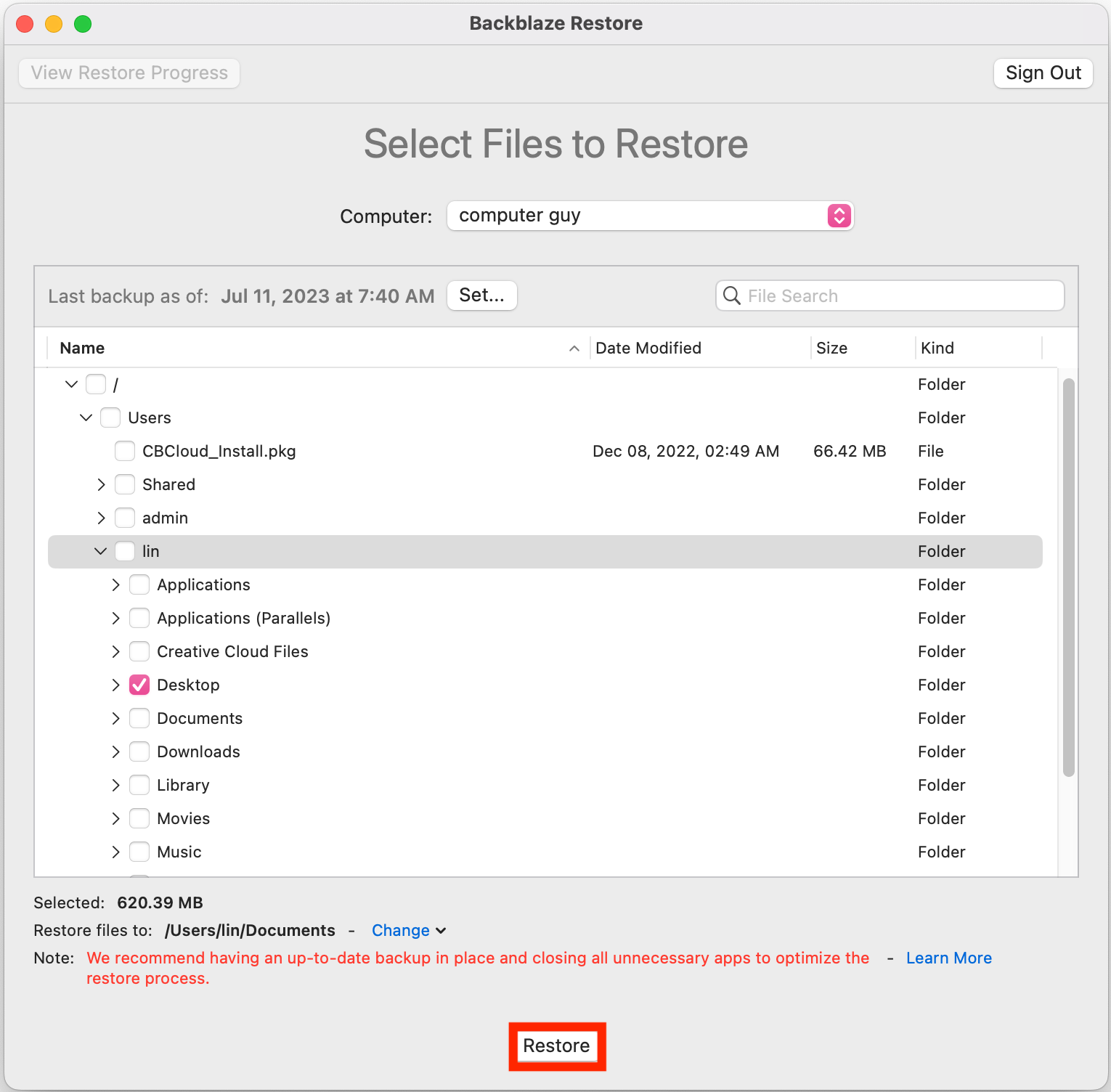
Online restore
Users can sign in, select files or folders and prepare a downloadable restore. This works well for individual documents, selected folders and moderate recovery sets. Very large restores depend on internet speed, available disk space and how the restore is packaged.
Desktop restore application
Backblaze’s restore application is intended to make larger online recoveries more manageable than manually downloading many separate archives. Users should still test a representative restore before an emergency and confirm that filenames, folders and permissions meet their needs.
Restore by Mail
For large data sets or slow broadband connections, Backblaze can copy recovery data to a physical drive and ship it. Pricing, availability, drive sizes, geographic coverage and refund terms can change, so check the current service conditions when needed.
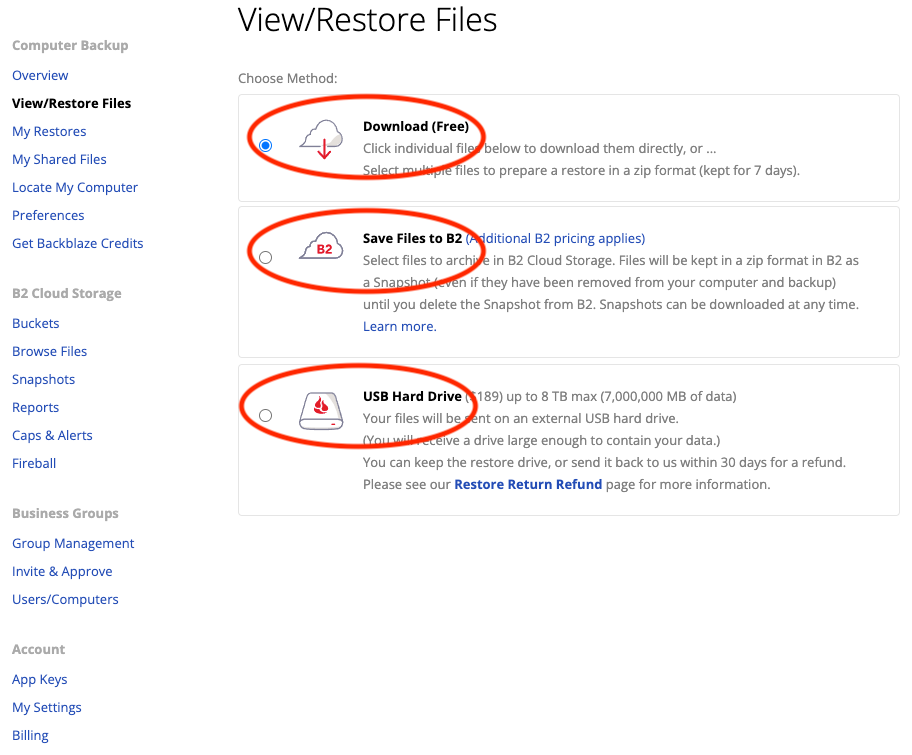
The important advantage is choice: a user facing several terabytes of lost data is not necessarily limited to downloading all of it over a home internet connection.
Security and encryption
Backblaze states that files are encrypted on the computer, transmitted over HTTPS and stored encrypted. Accounts also support two-factor authentication, which should be enabled immediately.
Users can add a private encryption key. Without that key, the backup cannot be decrypted; Backblaze cannot recover a forgotten key. This improves control but creates a serious responsibility: losing the key can make the backup permanently inaccessible.
There is also an important nuance for privacy-focused users. To create a restore, the private key must be supplied through Backblaze’s recovery workflow so the selected data can be decrypted and prepared. The service is therefore not the same as a system in which the provider can never receive the decryption secret during recovery. This may be acceptable for mainstream home use, but users with stricter threat models should assess it carefully.
Recommended security setup
- Use a unique password stored in a password manager.
- Enable two-factor authentication.
- Consider the private encryption key only if you can preserve it safely.
- Store account recovery details away from the protected computer.
- Enable one-year version history.
- Test both a recent-file restore and an older-version restore.
Performance and initial backup expectations
The first backup may take days or weeks because every selected file must be uploaded. Completion time depends on total data, broadband upload speed, computer availability and service conditions.
As a rough example, uploading 1TB over a connection that sustains 20Mbps continuously takes about five days in ideal conditions. Real transfers usually take longer because of protocol overhead, interruptions and periods when the computer is offline.
After the initial upload, Backblaze normally transfers new and changed data rather than repeating everything. This incremental behaviour makes ongoing protection much less demanding.
We have not assigned laboratory upload or restore-speed scores in this review. Published line speeds rarely predict real backup performance reliably, and a credible comparison requires controlled tests across the same hardware, connection and data set.
Backblaze apps and usability
The Windows and Mac clients are intentionally restrained. The software focuses on backup status, scheduling, exclusions, performance settings, reports and security rather than presenting dozens of advanced backup jobs.
That simplicity benefits people who want protection to run automatically. Power users may find the limited control frustrating, particularly if they prefer hand-built backup sets, custom retention rules or full disk images.
Mobile access should not be confused with full phone backup. The mobile app can help users access data already backed up from their computer, but Backblaze Personal Backup is not a comprehensive iPhone or Android device-backup replacement.
Backblaze versus IDrive
| Feature | Backblaze | IDrive Personal |
|---|---|---|
| Storage model | Unlimited per computer | Shared 5TB or 10TB allowance |
| Computer count | One per licence | Multiple devices within allowance |
| Ease of setup | Very simple and automatic | More options and configuration |
| Best fit | One computer with lots of data | Household with several devices |
| Capacity management | No normal storage quota | Must monitor allowance and overage |
Backblaze wins for one main computer and minimal administration. IDrive is usually the better-value shape for several computers and phones sharing one subscription. Our best personal cloud backup guide compares both approaches in more detail.
Backblaze versus Carbonite
Both companies offer automatic unlimited backup priced per computer. Backblaze’s plan structure is easier to understand, while Carbonite divides some capabilities across Basic, Plus and Prime tiers.
Users comparing the two should examine external-drive support, automatic video backup, version retention and recovery choices rather than looking only at the headline annual price. Backblaze’s free one-year history option is a meaningful advantage for detecting problems late.
Who should choose Backblaze?
Backblaze is a strong choice if:
- You have one main Windows PC or Mac.
- You want backup to run with minimal configuration.
- Your data could grow beyond a fixed storage allowance.
- You use connected external drives for photos or video.
- You want predictable pricing without storage overage.
- You are comfortable reinstalling the operating system and applications after a total failure.
Consider an alternative if:
- You need to protect several family computers under one account.
- You require complete disk images or bare-metal recovery.
- You want to back up a NAS or server through the consumer plan.
- You need highly granular scheduling and retention policies.
- Your security requirements demand a different zero-knowledge recovery model.
How we would configure Backblaze
- Start the 15-day trial on the main computer.
- Review the selected drives and exclusions.
- Connect every external drive that needs protection.
- Enable one-year version history.
- Turn on two-factor authentication.
- Allow the initial backup to complete.
- Restore several files into a separate test folder.
- Keep an independent local backup on another drive.
- Check backup status and external-drive coverage regularly.
This creates a stronger 3-2-1-style arrangement: working data on the computer, a local copy for fast recovery and an off-site copy in Backblaze.
Frequently asked questions
Is Backblaze really unlimited?
Backblaze Personal Backup does not impose a normal capacity allowance on supported data from one licensed computer. Every additional computer needs another subscription, and NAS or server data is not covered by the Personal plan.
Does Backblaze back up external hard drives?
Yes, directly connected supported drives can be included. They must remain part of the backup routine and be reconnected according to Backblaze’s current requirements. Network-attached storage is not included.
Does Backblaze back up the entire computer?
No. It focuses on user-created files and excludes operating-system and application files. It is not a bootable system image. Reinstall the operating system and applications first, then restore personal data.
What happens if I delete a file?
The deleted file remains recoverable during the selected version-history period. The default is 30 days, while one-year history can currently be enabled free. Forever history is a paid option for data retained beyond one year.
Can Backblaze recover files after ransomware?
It can help when clean earlier versions remain within version history and the backup account has not been compromised. Use MFA, enable one-year history and keep an additional offline or isolated backup.
Is Backblaze suitable for a family?
It can protect every family computer, but each needs its own licence. A shared-capacity competitor may cost less when several machines hold a moderate amount of data.
Is Backblaze available in the UK?
UK customers can subscribe, although prices are displayed in US dollars and card-provider exchange rates or taxes may affect the final cost. Physical restore options should be checked for current international shipping terms.
Final verdict
Backblaze earns our recommendation as the best straightforward personal cloud backup service for one computer. Unlimited capacity, automatic protection and simple pricing solve the problems that prevent many people maintaining a reliable off-site backup.
It is not the best tool for every job. Multi-computer households may get better value from IDrive, users requiring full-machine images should consider Acronis, and NAS owners need B2 or another compatible service. The one-computer licence is Backblaze’s most important limitation.
For its intended audience, however, the proposition is excellent: install it, confirm the correct drives, enable one-year history, secure the account and test a restore. Used alongside a local backup, Backblaze forms a practical and affordable home data-protection plan.
Editorial independence: Prices and features were checked against official Backblaze information on 23 September 2026. This draft contains no paid placement. If an affiliate relationship is added later, it will not determine the rating or recommendation.