pCloud Review 2026: Is Lifetime Cloud Storage Worth It?
Our independent pCloud review examines backup, sync, lifetime plans, file recovery, pCloud Encryption, pricing and the service’s main limitations.
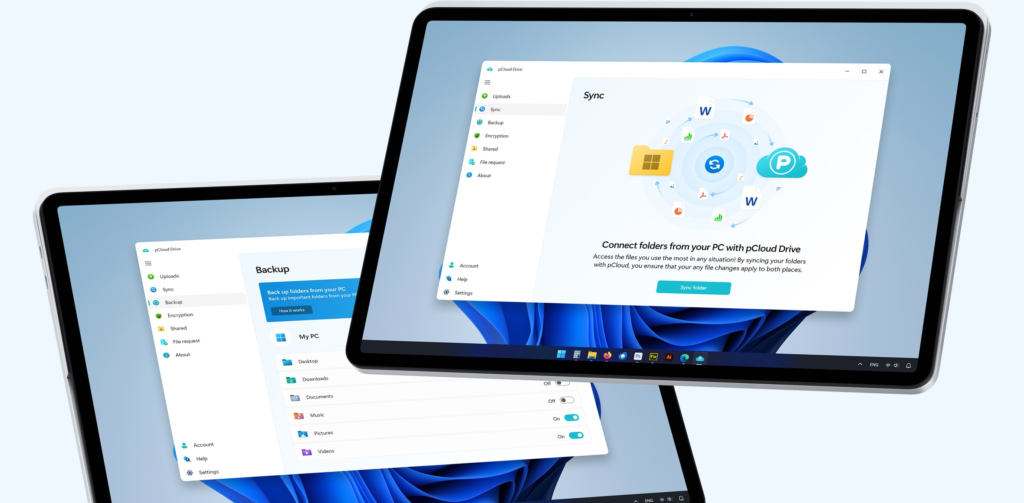
pCloud is a versatile choice for people who want cloud storage, synchronisation, sharing and selected-folder backup in one service. Its cross-platform apps and lifetime options stand out, but storage is capped and advanced Encryption or longer file history may add to the total cost.
What we like
- ✓Windows, macOS, Linux and mobile apps
- ✓Lifetime payment options
- ✓Storage, sync, sharing and backup in one account
- ✓File recovery with Revisions, Trash and Rewind
- ✓Optional zero-knowledge Crypto Folder
Where it falls short
- –Storage capacity is not unlimited
- –Not designed for full system-image recovery
- –Client-side Encryption may cost extra
- –Extended File History is an additional purchase
Rating breakdown
Affiliate disclosure: we may earn a commission from selected links, without increasing the price you pay. This does not determine our verdict.
pCloud is a flexible cloud storage service with useful backup, synchronisation and file-recovery features. It stands out for its lifetime purchase options, broad desktop and mobile support, media features and optional client-side encryption. However, it is not a direct replacement for every traditional online-backup service, particularly when you need unlimited storage, full system imaging or centrally managed endpoint protection.
Review basis: This independent review assesses pCloud using its current published plans, documentation, security information and recovery features. We do not claim controlled upload-speed or restore-test results that have not yet been measured. Details were checked on 28 September 2026.
Affiliate disclosure: We may earn a commission if you purchase through marked links, at no extra cost to you. Affiliate relationships do not determine our scores, rankings or conclusions.
pCloud review: quick verdict
pCloud is most compelling for people who want one service for cloud storage, file syncing, sharing and selected-folder backup. The lifetime plans can be attractive to users who prefer a single payment rather than another annual subscription, although the value depends on how long the service and your needs remain aligned.
Its main limitation is positioning: pCloud combines cloud-drive and backup functions, but it is not an unlimited set-and-forget computer-backup product in the same mould as Backblaze. Storage is capped by the selected plan, and some advanced privacy and extended-history features may require separate purchases.
| Best for | Consider another service if you need |
|---|---|
| Cloud storage, sync and backup in one account | Unlimited computer backup |
| Lifetime storage-payment options | Full disk-image or bare-metal recovery |
| Windows, macOS, Linux and mobile access | Long retention included as standard |
| Optional zero-knowledge encrypted storage | Zero-knowledge encryption across every file without an add-on |
| Sharing, media playback and remote access | Advanced enterprise endpoint administration |
View pCloud plans and pricing →
What is pCloud?
pCloud is a cloud-storage platform for storing, accessing, synchronising, sharing and backing up files. Accounts can be accessed through the web, desktop applications and mobile apps. Its desktop software supports Windows, macOS and Linux, which is broader platform coverage than many consumer cloud-drive services.
The service separates several related jobs that are often described collectively as “cloud backup”:
- pCloud Drive provides a virtual cloud drive so files remain available without permanently consuming the same amount of local disk space.
- Sync keeps selected folders aligned across devices.
- Backup copies selected computer folders into the account and reflects subsequent changes.
- Revisions, Trash and Rewind provide ways to recover deleted files or earlier versions within the available history period.
- pCloud Encryption provides an optional Crypto Folder protected with client-side, zero-knowledge encryption.
This mix makes pCloud useful, but it also means buyers should not assume it behaves like a conventional whole-computer backup product. A synced deletion or unwanted change can propagate, so file history and independent backup copies still matter.
pCloud plans and pricing
pCloud offers free storage, recurring Personal subscriptions, Business plans and one-time Lifetime options. Personal paid plans commonly centre on 500GB and 2TB capacities, while larger lifetime tiers may also be available. Prices and promotions change, so the checkout page should be treated as authoritative.
| Plan type | Typical use | Important consideration |
|---|---|---|
| Free | Trying the apps and basic storage | Limited capacity and shorter recovery history |
| Premium 500GB | Documents, photos and lighter personal use | May be restrictive for several computers |
| Premium Plus 2TB | Larger personal libraries and selected-folder backup | Storage remains capped |
| Lifetime | Users seeking to avoid recurring storage fees | A lifetime purchase is a long-term service commitment, not ownership of infrastructure |
| Business | Teams needing user management, sharing and collaboration | Compare administration and retention needs carefully |
When comparing lifetime pricing with annual subscriptions, calculate a realistic break-even period and include optional extras such as Encryption and Extended File History. A discounted one-time price can be good value, but it should not override suitability, recovery requirements or the need for a second independent copy.
Backup and synchronisation
pCloud Backup can continuously protect selected folders from a computer. This is convenient for documents, photographs and other user-created files, particularly when the same account is also used for remote access. Only the latest stored version counts toward the main storage quota according to pCloud’s published backup explanation, while earlier versions remain available through the applicable history system.
There are several practical limitations to understand:
- Capacity is shared across the account rather than unlimited.
- It is designed around files and folders rather than full system images.
- It should not be your only copy of irreplaceable data.
- Sync and backup are related but not identical; users should verify which folders are configured for each.
- Restores should be tested periodically rather than assumed to work.
For a household that wants to protect selected folders from multiple devices, a sufficiently large pCloud plan can be convenient. For a workstation that needs a complete operating-system image, application-state recovery or unlimited capacity, a specialist backup service is likely to be more appropriate.
File recovery, versions and pCloud Rewind
pCloud provides several recovery mechanisms. Trash restores deleted items, Revisions recovers earlier versions of individual files, and Rewind can return the account’s file structure to an earlier point. Paid Personal and Lifetime plans currently advertise recovery for up to 30 days, while free plans have a shorter window. Business history may differ.
An Extended File History add-on can extend eligible recovery history to as much as 365 days. This can be valuable after accidental deletion or a problem that remains unnoticed for several months, but it increases the effective cost and should be compared with competitors that include longer retention in the base price.
Rewind is particularly relevant where a large number of files have been renamed, moved, overwritten or deleted. It is still important to distinguish convenient account rollback from a separate immutable backup. Credentials, local devices and synchronised data can share common risks, so a layered 3-2-1 strategy remains safer.
Security and pCloud Encryption
pCloud states that ordinary stored data is protected during transfer and at rest. For users who require provider-inaccessible encryption, pCloud Encryption adds a Crypto Folder with client-side, zero-knowledge protection. Files placed inside that folder are encrypted before upload, and pCloud says it does not possess the Crypto Pass needed to decrypt them.
That design improves privacy for sensitive records, but it introduces responsibilities:
- The Crypto Pass must be strong, unique and safely retained.
- Forgotten zero-knowledge credentials may make encrypted files unrecoverable.
- Only files placed inside the Crypto Folder receive this client-side encryption model.
- Encryption may be an additional purchase on Personal plans.
People evaluating pCloud principally for privacy should compare the total plan-plus-Encryption price with services that include zero-knowledge encryption across paid storage by default.
Desktop, mobile and web experience
pCloud provides applications for Windows, macOS, Linux, iOS and Android, alongside browser access. pCloud Drive is useful on computers with limited local storage because it exposes cloud files through a virtual drive. Users can choose to make important content available offline where required.
The platform also includes file sharing and media playback features. These make pCloud more versatile than a narrowly focused backup client, especially for photographs, audio, video and documents used across several devices. The trade-off is additional complexity: users must understand the difference between stored, synced, backed-up and offline files.
pCloud for business
pCloud Business adds team-oriented administration, user management, shared folders and collaboration controls. It may suit smaller organisations that primarily need secure file storage and sharing with backup-style protection for selected data.
Before adopting it as a business backup platform, assess regulatory obligations, administrator visibility, user offboarding, retention requirements, restore procedures and whether server, SaaS or full-endpoint workloads need protection. Businesses requiring Microsoft 365 backup, server imaging or centralised endpoint policies may need a dedicated business-backup product alongside—or instead of—pCloud.
pCloud advantages
- Windows, macOS, Linux, iOS, Android and web access.
- Combines storage, synchronisation, sharing and selected-folder backup.
- Lifetime plans provide an alternative to recurring subscriptions.
- Virtual-drive functionality can reduce local storage use.
- Useful file recovery through Trash, Revisions and Rewind.
- Optional client-side, zero-knowledge encrypted Crypto Folder.
- Personal, Family and Business options cover different audiences.
pCloud disadvantages
- It is not unlimited online backup.
- Not designed for full system-image or bare-metal recovery.
- Zero-knowledge Encryption may cost extra on Personal plans.
- Longer Extended File History is an additional purchase.
- Lifetime value depends on long-term service continuity and changing storage needs.
- Users must understand the differences between sync, backup and cloud-drive storage.
Who should choose pCloud?
pCloud is a good candidate for individuals, freelancers and small teams that want accessible cloud storage with automatic folder backup, cross-platform apps and file sharing. It is especially attractive when a lifetime plan reaches a sensible break-even point and the selected capacity is likely to remain sufficient.
Choose a more traditional backup service if your priority is unlimited computer backup, full-device recovery, very long retention included as standard or specialised protection for servers and SaaS platforms. In many cases pCloud works best as one layer of a broader backup strategy rather than the only protective copy.
Final verdict
pCloud earns its place on a cloud-backup shortlist because it combines useful backup and recovery tools with an unusually flexible cloud-storage platform. Its cross-platform support and lifetime plans are genuine differentiators. The optional Crypto Folder also gives privacy-conscious users a strong protection choice for selected files.
The service is less convincing as a direct substitute for unlimited, image-based or enterprise backup. Buyers should account for storage limits and any Encryption or Extended File History add-ons before comparing the total cost. Used for the right workload—and backed by another independent copy—pCloud is a capable and versatile option.