CrashPlan Review 2026: Is It Best for Small Business Backup?
CrashPlan provides unlimited endpoint backup for small businesses. Our 2026 review examines pricing, retention, restores, security and fair-use limits.
CrashPlan is an excellent choice for small-business endpoint backup when unlimited storage, Linux support and flexible version retention matter. It is less suitable for NAS, server or full-system image recovery.
What we like
- ✓Unlimited endpoint cloud storage
- ✓Windows, macOS and Linux support
- ✓Flexible versioning and central administration
Where it falls short
- –No full-system image or bare-metal recovery
- –Unlimited use excludes NAS and server archives
- –Per-user pricing grows with team size
Rating breakdown
Affiliate disclosure: we may earn a commission from selected links, without increasing the price you pay. This does not determine our verdict.
CrashPlan focuses on continuous endpoint backup for small businesses rather than consumer photo storage or full server imaging. Our independent 2026 review examines its pricing, unlimited cloud storage, version history, restore tools and important fair-use limits.
CrashPlan review: quick verdict
| Our verdict | A strong endpoint-backup service for small teams that value unlimited storage, detailed retention controls and central administration. |
|---|---|
| Best for | Small businesses backing up Windows, macOS and Linux employee computers |
| Current price | $88 per user for one year or $158 per user for two years |
| Storage | Unlimited cloud storage for eligible endpoint backups, subject to fair-use terms |
| Version history | Unlimited versioning with configurable retention controls |
| Supported computers | Windows, macOS and Linux |
| Our assessment | 8.9 out of 10 |
CrashPlan is most convincing when a business needs dependable file-level backup across staff computers and does not want to estimate storage capacity in advance. It combines automatic backup, rich file-version history and an administrator console in a relatively simple per-user subscription.
It is not a universal backup system. CrashPlan’s unlimited endpoint allowance does not turn the product into unrestricted NAS, server or network-drive storage. Businesses that need disk imaging, rapid bare-metal recovery or broad SaaS backup should compare specialist alternatives.
CrashPlan pricing in 2026
CrashPlan currently lists straightforward annual and two-year pricing for its small-business endpoint plan:
| Billing option | Price per user | Effective monthly cost |
|---|---|---|
| One year | $88 | About $7.33 |
| Two years | $158 | About $6.58 |
Each user licence covers endpoint backup with unlimited cloud storage and versioning. The two-year term lowers the effective monthly cost, but businesses should test deployment and restore workflows before making a longer commitment. Check the official CrashPlan pricing page for the latest terms.
What CrashPlan does well
Unlimited endpoint storage
The headline advantage is predictable capacity. A user with a large working-data set does not need to choose a 1TB, 5TB or 10TB allowance before backup begins. That makes CrashPlan attractive for designers, consultants and other teams whose laptop or desktop data changes substantially over time.
Unlimited still has boundaries. CrashPlan’s fair-use policy applies to eligible endpoint backups and excludes uses such as treating the service as general-purpose NAS, server or network-mapped-drive storage. Read the current policy before deploying it to unusually large or specialised environments.
Versioning and deleted-file recovery
CrashPlan can retain multiple versions of protected files and lets administrators configure version frequency and retention. The restore browser can show previous versions and deleted items, making the service useful for recovering from accidental overwrites, unwanted edits or ransomware-related changes.
Retention settings matter. Deleted files only remain recoverable for as long as the organisation’s configured policy allows, so administrators should confirm those settings rather than assuming every deleted item will remain forever.
Central controls for small teams
The administration console provides visibility across users and devices. Policies can control backup schedules, exclusions and selected user options. That is a meaningful step up from a purely personal backup product when an owner or IT administrator needs consistent protection across a team.
How CrashPlan backup works
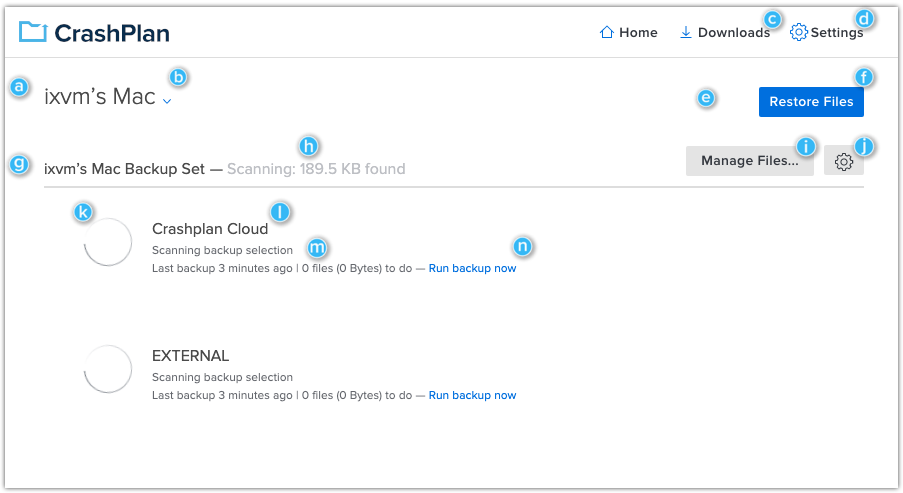
After the desktop app is installed and linked to the organisation, CrashPlan monitors the selected folders and sends eligible file changes to its cloud destination. Backup sets let administrators separate data groups, apply exclusions and assign schedules or priorities.
- Always keep up to date: backup runs while the computer is available.
- Scheduled windows: restrict backup to selected days and times.
- File exclusions: omit file types or patterns that should not enter the archive.
- External drives: supported when configured correctly and reconnected consistently.
External-drive backup is useful, but it should not be confused with NAS protection. A directly attached drive can be included, while network shares and server workloads fall outside the ordinary unlimited endpoint use case.
Restoring files
Users can open Restore Files in the CrashPlan app, browse or search their archive, choose a date or specific version and download the required files. Restore options include the Downloads folder, Desktop, original location or another chosen folder. Existing files can be renamed or overwritten, and permissions can be handled during recovery.
Administrators can also restore from the web console. Smaller selections can be prepared as ZIP downloads, while device restores provide another path for managed recovery. As with any backup product, a business should perform regular sample restores rather than treating a successful status indicator as the only proof of recoverability.
Security and encryption
CrashPlan protects data in transit and at rest and supports account-level security controls. Depending on the configuration, organisations can use the standard account-password model, an archive-key password or a custom encryption key. Stronger key control also increases responsibility: losing a custom key can make the backup unrecoverable.
Businesses should require multi-factor authentication where available, limit administrative access and document who controls recovery credentials. Security is not only an encryption specification; it also depends on deployment policy, account hygiene and tested recovery procedures.
Where CrashPlan falls short
- No full-system imaging: it protects files rather than producing a complete bootable machine image.
- Per-user pricing: costs grow directly with team size.
- Unlimited has limits: ordinary endpoint licensing is not intended for NAS or server archives.
- Business-oriented interface: home users may find simpler consumer services easier to understand.
- Large restores take time: cloud recovery speed still depends on the internet connection and the amount of data.
CrashPlan versus alternatives
| Service | Best fit | Main difference |
|---|---|---|
| CrashPlan | Managed employee endpoints | Unlimited endpoint storage, Linux support and detailed retention |
| Backblaze Business | Simple computer backup | Very easy deployment with a consumer-style experience |
| IDrive Business | Many device types sharing capacity | Pooled storage across computers, mobiles and selected server workloads |
| Acronis Cyber Protect | Integrated backup and security | Disk imaging and broader cyber-protection tools |
CrashPlan is the clearest choice when file-level endpoint backup, version history and administrator oversight are the priorities. IDrive may suit organisations that prefer shared capacity across varied devices, while Acronis is stronger when full-system imaging and security tooling are required.
Who should choose CrashPlan?
CrashPlan is well suited to small companies, distributed teams and professional users with large working-data sets on Windows, Mac or Linux computers. It is particularly attractive where predictable storage costs and long version history matter more than whole-machine recovery.
Look elsewhere if the main requirement is NAS backup, server backup, Microsoft 365 or Google Workspace protection, or rapid bare-metal recovery. Those needs call for a different product category or an additional backup layer.
CrashPlan review: final verdict
CrashPlan earns a strong recommendation for small-business endpoint protection. Unlimited storage, Windows/macOS/Linux support, flexible retention and central management form a compelling package for organisations that want reliable file backup without capacity planning.
The main caveat is scope. CrashPlan is excellent at protecting files on employee computers, but it is not a replacement for full-system imaging, NAS backup or SaaS application backup. Used for the job it is designed to do, it is one of the strongest business-focused cloud backup options in this guide.
Frequently asked questions
Is CrashPlan really unlimited?
CrashPlan includes unlimited cloud storage for eligible endpoint backups, subject to its current fair-use policy. That allowance does not extend to every form of server, NAS or network storage.
Does CrashPlan back up external drives?
Yes. A directly attached external drive can be included, provided it is connected regularly and its path remains consistent. Review the current support guidance before relying on it for critical data.
Can CrashPlan restore deleted files?
Yes, while the deleted files remain inside the organisation’s configured retention window. Users must enable the option to show deleted files in the restore browser.
Does CrashPlan create a full system image?
No. CrashPlan is a file-level backup service. Businesses needing bare-metal or complete-machine recovery should add an image-based backup product.
Editorial note: this independent assessment is based on current product documentation, published pricing and feature information checked on 23 September 2026. We have not claimed hands-on laboratory testing where it was not performed.