Acronis True Image Review 2026: Complete Backup and Recovery
Acronis True Image combines full-system backup, disk cloning and ransomware protection. Our independent 2026 review examines plans, cloud storage and recovery.
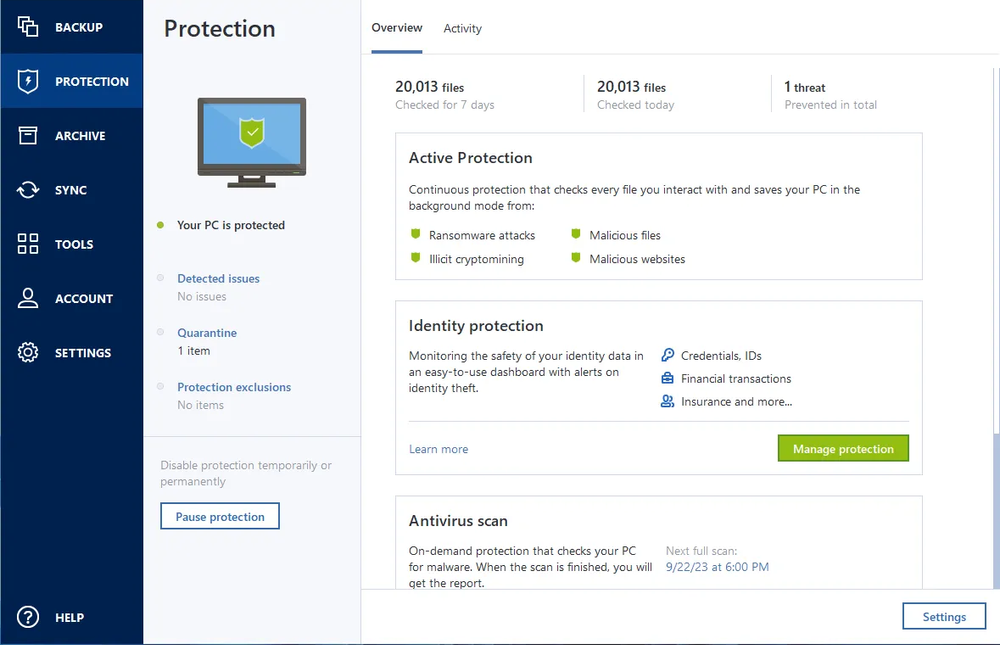
Acronis True Image is an excellent choice when complete-machine recovery matters. Full disk images, cloning, rescue media and integrated ransomware protection provide far broader recovery than a file-only service, although cloud storage requires a higher tier and the product needs more configuration.
What we like
- ✓Complete-system image backup
- ✓Active disk cloning and rescue media
- ✓Local, NAS and eligible cloud destinations
- ✓Integrated ransomware and malware protection
- ✓Flexible scheduling and retention
Where it falls short
- –Essentials does not include cloud storage
- –More complex than automatic file backup
- –Cloud capacity increases the total price
- –Security features may overlap existing software
Rating breakdown
Affiliate disclosure: we may earn a commission from selected links, without increasing the price you pay. This does not determine our verdict.
Acronis True Image is the strongest option in our current personal-backup shortlist for complete-system images, disk cloning and integrated ransomware protection. It can preserve an entire Windows PC or Mac—not only personal files—and combines local backup with cloud protection on higher tiers. The trade-off is greater complexity and a plan structure that requires careful reading.
Review basis: This independent review assesses Acronis True Image using current published plans, documentation, security features and recovery options. We do not claim controlled speed, malware-detection or restore-test results that have not yet been independently measured. Details were checked on 23 September 2026.
Acronis True Image review: quick verdict
| Our verdict | Excellent for full-system backup, disk cloning and layered cyber protection |
|---|---|
| Best for | Power users, creators and home offices that need complete-machine recovery |
| Current price | Essentials from $49.99 yearly; cloud backup requires Advanced or Premium |
| Storage | Local backup on all tiers; cloud allowance depends on plan |
| Core strength | Full disk images containing the operating system, applications, settings and files |
| Supported devices | Windows, macOS, Android and iOS |
| Subscription | One-year plans for one, three or five computers |
| Our assessment | 4.55 out of 5 |
Bottom line: choose Acronis when rebuilding the complete computer matters more than simply downloading documents and photos. Essentials is a capable local imaging product, but it is not a cloud-backup plan. Advanced is the more relevant starting point for off-site protection, while Premium targets users who need larger cloud capacity and the broadest security set.
What is Acronis True Image?
Acronis True Image is a personal backup, disk-imaging, cloning and cybersecurity suite. The product was known for several years as Acronis Cyber Protect Home Office before returning to the True Image name.
Its defining feature is full-image backup. A disk image can contain the operating system, installed applications, configuration, boot information and personal data. This allows a failed drive or replacement computer to be restored more completely than a file-only backup service.
True Image 2026 also adds built-in patch-management capabilities alongside its existing anti-malware and anti-ransomware tools. The combination is intended to protect data both reactively through backups and proactively through security monitoring.
Acronis True Image pricing in 2026
Acronis offers Essentials, Advanced and Premium subscriptions. Prices can vary by country, computer count and promotion, so the final renewal figure should be checked before purchase.
| Plan | Published starting position | Cloud backup | Best for |
|---|---|---|---|
| Essentials | From $49.99 yearly for one computer | No Acronis cloud allowance | Local images, cloning and anti-ransomware protection |
| Advanced | From approximately $72.99 yearly | Included allowance varies by current offer | Local and cloud backup with broader security |
| Premium | Higher annual price | Starts with 1TB and supports larger options up to 10TB | High-capacity cloud backup and the fullest feature set |
The official Acronis True Image page currently lists Essentials from $49.99 and Advanced from $72.99. The plan comparison should be used to confirm cloud capacity, device count and renewal cost.
The Essentials pricing trap
The least expensive plan is easy to misinterpret. Essentials provides local backup and recovery rather than an Acronis cloud-storage allowance. It can create valuable disk images on external drives or NAS storage, but an off-site cloud copy requires Advanced or Premium.
That does not make Essentials poor value. It is suitable for users who already maintain a separate off-site backup or primarily want imaging and cloning. It simply should not be purchased under the assumption that the headline price includes cloud backup.
Full-image backup
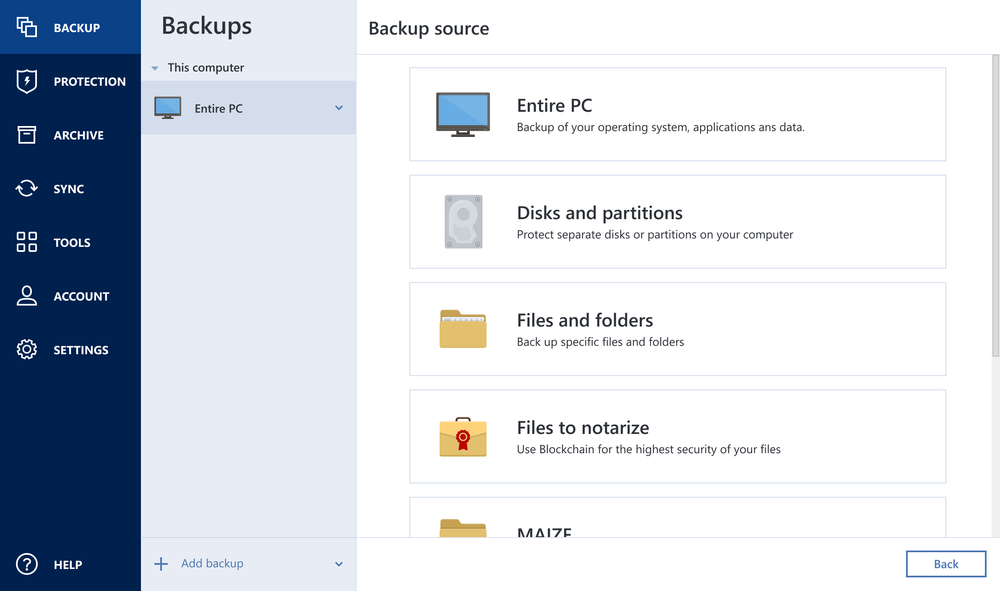
A full image captures far more than selected folders. In a serious drive failure, users can restore the system environment rather than reinstalling Windows or macOS, downloading applications, recreating settings and then restoring personal files separately.
True Image supports:
- Entire-machine backup
- Disk and partition backup
- File and folder backup
- Local destinations including external drives
- NAS destinations where supported
- Acronis Cloud on eligible subscriptions
- Scheduled and incremental backup workflows
Image backup is especially valuable for computers with specialist software, complex configuration or large creative projects. It is also useful before a major operating-system update or hardware change.
Recovery and bootable rescue media
A system image is only useful if it can be restored when the normal operating system will not start. Acronis provides bootable recovery media and recovery workflows intended to restore complete images to a repaired or replacement disk.
Users should create rescue media immediately, label it and confirm that the computer can boot from it. Waiting until after a failure to discover a firmware, storage-controller or encryption issue defeats much of the benefit.
A credible test does not always require overwriting the main computer. At minimum, verify that recovery media boots, detects the backup destination and can browse the expected image. Advanced users can conduct a complete restore onto a spare drive.
Disk cloning
Active Disk Cloning creates a replica of a drive and is useful when replacing an ageing hard disk with an SSD, increasing capacity or migrating to new storage.
Cloning and backup solve related but different problems. A clone is usually a current copy designed for migration or rapid substitution. A versioned backup preserves multiple recovery points and can remain disconnected or off-site. A clone connected permanently to the computer may copy corruption or be exposed to the same ransomware event.
Use cloning for migration, but retain scheduled versioned backups for protection.
Cloud backup
Advanced and Premium plans can send complete machines or selected data to Acronis Cloud, depending on available capacity. Cloud backup creates an off-site copy that remains available if local hardware is stolen, damaged or destroyed.
Cloud image files are large. A computer with 2TB of used storage cannot fit inside a 500GB allowance without exclusions or additional capacity. Buyers should measure protected data before choosing the plan rather than assuming the included allowance covers the entire disk.
Premium cloud capacity
Acronis states that Premium includes 1TB and can be configured with larger cloud options up to 10TB. The total price rises with storage and protected-computer count, so a high-capacity configuration should be compared with separate imaging software plus a conventional cloud-backup service.
Ransomware and malware protection
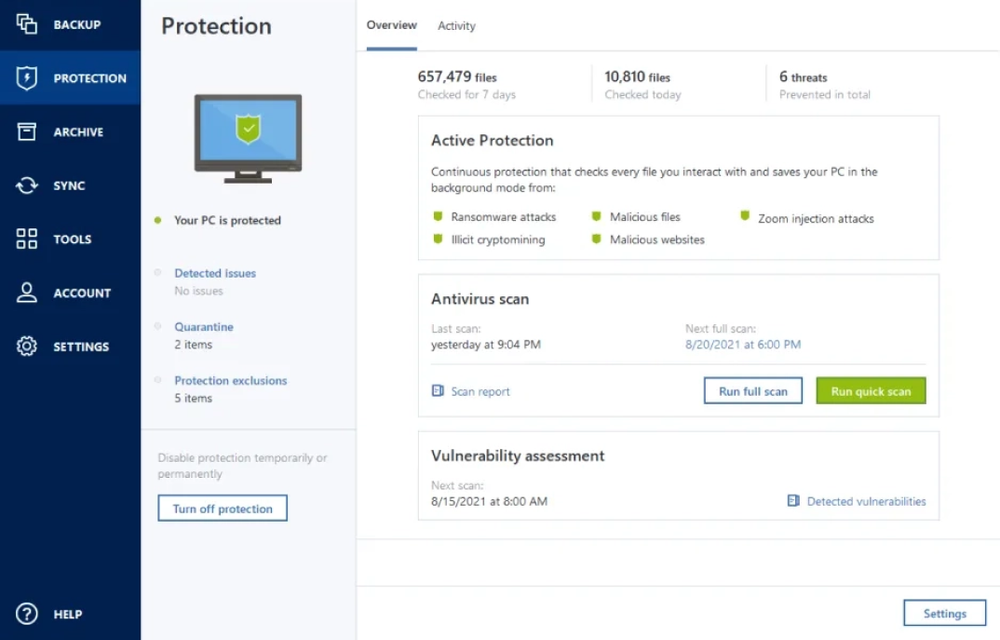
True Image combines backup with active security functions. Acronis describes AI-based monitoring for suspicious encryption behaviour, anti-ransomware protection, malware scanning and automatic recovery of affected files in supported scenarios.
This integration can reduce the gap between security software and backup. The application protecting the backup can react when it detects an attempted attack, rather than relying only on later restoration.
It should not create false confidence. No security product guarantees prevention of every attack. Maintain multi-factor authentication, offline or isolated copies and recovery media. Organisations with managed endpoint-security requirements may still need a dedicated business product.
Patch management in True Image 2026
The 2026 release introduces built-in patch management intended to help keep supported Windows applications updated. Unpatched software can contain vulnerabilities exploited by attackers, so combining update awareness with backup and malware protection is logical.
Patch management should be configured carefully. Updates can occasionally introduce compatibility problems, especially on specialist creative or engineering systems. Maintain a current system image and review critical application requirements before automating every update.
Backup scheduling and retention
Acronis supports flexible scheduling for complete, incremental and differential backup strategies. Users can design schemes that balance storage use, upload time and the number of available recovery points.
This flexibility is powerful but less approachable than Backblaze’s automatic model. A sensible home configuration might use:
- A regular full image
- Incremental backups between full images
- Automatic cleanup after a defined number or age of versions
- A local external-drive destination
- A second off-site or cloud destination
Do not retain only one continuously updated image. Multiple recovery points are needed when corruption or malware is discovered after the latest backup.
Security and encryption
Acronis documents encryption for protected backups and supports user-specified encryption keys. A private password can prevent the provider or an unauthorised account user from reading the backup, but losing it may make recovery impossible.
Enable multi-factor authentication for the Acronis account, use a unique password and store any encryption key securely outside the protected computer. Rescue media and local backup drives should also be physically protected.
Mobile backup
Acronis subscriptions can protect an unlimited number of supported mobile devices, while licences for desktop computers are sold for one, three or five PCs or Macs.
Mobile backup can preserve supported photographs, videos, contacts and other device data. Platform restrictions apply, so it should not be assumed to create a complete bootable image of a phone. Test recovery of representative mobile data separately.
Acronis True Image versus Backblaze
| Feature | Acronis True Image | Backblaze Personal |
|---|---|---|
| Primary strength | System images, cloning and cybersecurity | Simple unlimited file backup |
| Storage model | Local plus tiered cloud capacity | Unlimited cloud data per computer |
| Full-system image | Yes | No |
| Disk cloning | Yes | No |
| Configuration | Detailed and flexible | Mostly automatic |
| Best fit | Complete-machine recovery | Effortless protection of personal files |
Choose Acronis when operating-system, application and disk recovery matters. Choose Backblaze when one computer holds a large amount of personal data and you want the simplest unlimited off-site backup. Read our Backblaze review for the file-backup alternative.
Acronis True Image versus IDrive
| Feature | Acronis True Image | IDrive Personal |
|---|---|---|
| System imaging | Core strength | Available tools, but broader multi-device focus |
| Multiple computers | One, three or five-device licences | Several devices share one allowance |
| Cybersecurity | Integrated anti-malware and ransomware protection | Backup security and snapshot recovery |
| Cloud capacity | Depends on Advanced or Premium configuration | Shared Personal-plan allowance |
| Best fit | Full machine and security suite | Family with many devices |
IDrive is generally the better shape for a household protecting many devices. Acronis is stronger for users who prioritise sophisticated imaging, cloning and integrated endpoint protection. See our IDrive review.
Who should choose Acronis True Image?
Acronis is a strong choice if:
- You need complete-system images.
- You regularly replace or clone drives.
- You want local and cloud backup within one product.
- You value integrated anti-ransomware and malware protection.
- Your computer has specialist applications and configuration.
- You are comfortable managing backup schedules and retention.
Consider an alternative if:
- You only need automatic backup of personal files.
- You want unlimited cloud capacity at one simple price.
- You have many household computers and prefer one pooled account.
- You already pay for security software with overlapping features.
- You are unlikely to create and test rescue media.
How we would configure Acronis
- Measure current disk usage before choosing cloud capacity.
- Create the first complete local image on an external drive.
- Create bootable rescue media and confirm it starts.
- Configure incremental backups between regular full images.
- Use an Advanced or Premium plan for an off-site cloud copy.
- Enable multi-factor authentication.
- Store encryption credentials in a password manager.
- Disconnect or isolate at least one local backup copy.
- Test file recovery and browse a system image.
- Review patch-management settings before automating updates.
Frequently asked questions
Does Acronis True Image include cloud backup?
Advanced and Premium include cloud capabilities. Essentials focuses on local backup and does not include an Acronis cloud-storage allowance.
Can Acronis restore an entire computer?
Yes. Full-image backups can include the operating system, applications, settings and data. Recovery media and a valid backup are required when the normal operating system cannot start.
Is Acronis True Image antivirus software?
It includes anti-malware, antivirus and anti-ransomware capabilities that vary by plan. Users should compare them with any existing security subscription to avoid unnecessary overlap.
Can Acronis clone a hard drive?
Yes. Active Disk Cloning is designed for drive migration and replacement. A clone should not be treated as the only versioned backup.
How much Acronis cloud storage do I need?
Check the used space on every protected disk and allow room for growth and retained versions. Premium begins with 1TB and offers larger options, while Advanced capacity depends on the current plan.
Does Acronis support Mac?
Yes, current Acronis documentation lists supported macOS versions as well as Windows. Some features differ by operating system, so the comparison page should be checked before purchase.
Can Acronis back up a NAS?
True Image can use supported NAS storage as a backup destination. Requirements differ from backing up NAS data itself as a server workload, so the exact intended workflow should be confirmed.
Final verdict
Acronis True Image is our leading recommendation for complete-system backup and disk recovery. It protects far more than documents: system images, cloning, rescue media and integrated cyber protection can substantially reduce the work required after a serious failure.
The product is more complex and potentially more expensive than a simple cloud-backup subscription. Essentials does not include cloud storage, while Advanced and Premium must be sized to the protected data. Security features may also overlap with software already installed.
For a creator, technical home user or home office that depends on a carefully configured computer, that complexity is justified. Build both local and off-site copies, create rescue media and prove that recovery works before relying on the system.
Editorial independence: Prices and features were checked against official Acronis information on 23 September 2026. Some links on this page are affiliate links. We may earn a commission if you purchase through them, at no extra cost to you. Affiliate relationships do not determine our ratings or recommendations.